Forum Discussion

Pinning: Where & How
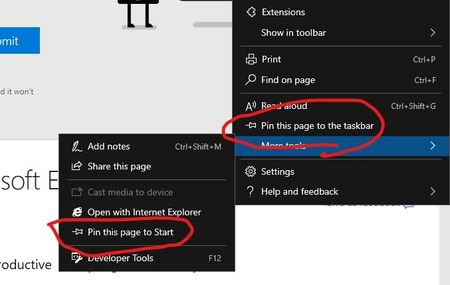

Drew1903 Thanks for the feedback on Pinned Sites. We are working through that whole story presently, and do plan on offering Pin to Start. Currently, if you click on ... > Apps > Install this site as an app, it will show up on your Start menu, on the Taskbar, as well as the Desktop. Feedback on this workflow is really crucial for us, so we appreciate you trying it out and letting us know what you think.
-John

johnjansen wrote:We are working through that whole story presently, and do plan on offering Pin to Start. Currently, if you click on ... > Apps > Install this site as an app, it will show up on your Start menu, on the Taskbar, as well as the Desktop. Feedback on this workflow is really crucial for us, so we appreciate you trying it out and letting us know what you think.
Correct me if I'm wrong, but the idea of pinning webpages as apps aims to allow users to open extra https://docs.microsoft.com/en-us/microsoft-edge/hosting/webview2 windows on desktop instead of sticking to one browser window? This might be suitable for dynamically updating webpages, as well as adding live tiles for them to Start Menu, as suggested here.
When it comes to linking webpages not frequently updated and neither aimed to be constantly monitored, I don't believe their shortcuts should be placed to Start Menu or Taskbar, since it can bring chaos to critical Windows productivity zones. For determined Taskbar users, I suggest to create a separate Taskbar Tab for links or Weblinks Toolbar similar to Desktop Toolbar - to save critical Taskbar space. For weblinks in Start Menu I suggest to dedicate a separate area My Web at Glance on the right, not mixing them with Programs Strip.
The most suitable place IMHO for frequent page shortcuts is browser's New Tab Speed Dial. It should retain dual functionality. It must auto collect most frequently visited pages. But users should be allowed to Edit the Dials by putting other pages they prefer. Once edited, such Dials can't be auto replaced with other frequent dials. Also, a user should be allowed to change number and size of dials. I tested many New Tab Chrome extensions, and think https://chrome.google.com/webstore/detail/the-new-tab-customize-you/ddjdamcnphfdljlojajeoiogkanilahc/related?hl=en is a good example of basic simplicity combined with user enabled adjustments.
Since users are now allowed to add frequent shortcuts to Speed Dial manually, and for some its a lot more important than placing weblinks to Taskbar or Start Menu, I suggest to add "Pin to SpeedDial" to other webpage pinning options.