Forum Discussion

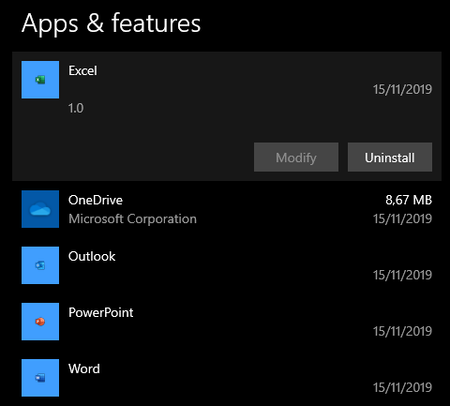
Outlook, PowerPoint, Excel, Word Version 1.0?!
- Nov 28, 2019They shouldn't be automatically installed, it never happened to me.
I have been using Edge insider since its launch, never seen any PWA app install automatically.
I use personal and work account (Office business + E5), tested it on VMs with AAD configuration and Office 365 licenses, still no PWA was created automatically.
It could be a side effect of that "stable" version, which is obviously not ready because Microsoft will officially release it on January 15 2020, 1.5 months from now, so things still aren't quite ready yet.

Hi boossy
those are PWAs (Progressive web apps), they are referring to the Outlook online, Word online, Excel online and so on. websites that are added as apps in Microsoft Edge all have version 1.
use Edge insider's app panel to view or remove them.
if they are put there by your system administrator (in case of work environment) then you can't do anything about it.
but since you can't see them anywhere, it looks like you had added them previously but then you uninstalled Edge without first removing the apps and now they are left alone as orphan apps.
you need to go to the Edge insider's install directory and remove them manually
for example I'm using Canary channel and the files you need to delete are here:
%localappdata%\Microsoft\Edge SxS\User Data\Default\Web Applications
 boossyNov 28, 2019Tin Contributor
Hi HotCakeX
I don't use the Edge insider's app, but the https://go.microsoft.com/fwlink/?linkid=2069324&Channel=Stable&language=en. I have rolled back my system to a point in time before the installation of the Chromium-based Edge, and have then re-installed the Chromium-based Edge. The four progressive web apps (Outlook, PowerPoint, Excel & Word) re-appeared. Now I was able to uninstall them.
One more question (or do I have to create a new discussion item?) - I have the new Edge browser on three devices, and only on my laptop at home do these progressive web apps appear after installation. On my Surface and my office pc, Edge installs without the progressive web apps? What triggers the installation of these four progressive Office web apps?
- HotCakeXNov 28, 2019MVPThey shouldn't be automatically installed, it never happened to me.
I have been using Edge insider since its launch, never seen any PWA app install automatically.
I use personal and work account (Office business + E5), tested it on VMs with AAD configuration and Office 365 licenses, still no PWA was created automatically.
It could be a side effect of that "stable" version, which is obviously not ready because Microsoft will officially release it on January 15 2020, 1.5 months from now, so things still aren't quite ready yet.