Forum Discussion

On version 20H2, the File Explorer on the taskbar often shows an active window with an Edge tab
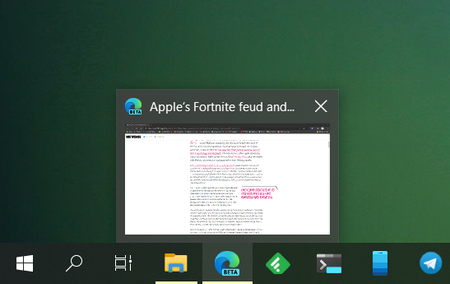
 Apr 05, 2021Same problem around here since august 2020. Yesterday, I found the flag #edge-window-tab-manager. If you disable it, the problem goes away. There's is a nausty bug with the integration of edge chromium in windows.

Hopefully it will soon make its way to 20H2 as well.

adrianghc I ran a search for Edge and File on the link you sent and didn't find the problem. Would you mind telling me where you saw that it was fixed?
Also, I was running that build before I reinstalled Windows I still had the issue. I actually had whatever the latest insider version was as of about 6 days ago. Are you running this build and the problem is gone for you? In my experience, the problem did not always show, but over the course of a couple of days I would encounter it.
- adrianghcOct 21, 2020Steel Contributor"We fixed an issue that could result in your ALT + Tab order changing unexpectedly and leading you to switch to the wrong window."
I thought that refers to the issue at hand. But I'm not running that build, it just sounded to me like it would be that. Also, the bug was acknowledged here: https://github.com/microsoft/WinDev/issues/40- MatmanOct 21, 2020Brass Contributor
adrianghc Ah, I don't think that's the same thing as our issue. It's not that the order changes, it's loading an Edge tab (often multiple tabs) as File Explorer icons, which isn't a problem with alt-tab, but a problem with how Windows 10 is displaying the Edge browser on the taskbar.
- adrianghcOct 21, 2020Steel ContributorI'm stupid, sorry. I had forgotten what my own thread here was about. Yes, you're right, of course. However, I also reported the issue at hand in the Feedback Hub and got my feedback there added to a collection, so I guess they're at least aware of it: https://aka.ms/AAa29c9