Forum Discussion

No PlayReady visible with the Chromium Edge


mafein
I'm guessing you have "PlayReady Hardware DRM support: flase" in about://gpu page.
I don't know about PlayReady requirements but your hope is that's a missing requirement on the driver side, and thus with an driver update you'll be set.
EDIT: I've now seen the screenshot you posted in the other thread and it appears you have Hardware DRM support , but you lack Direct Composition.
Too bad the latest Intel drivers for 3000 iGPU is from 2015...
Might be worth trying again with the Nvidia GPU and using the latest Nvidia drivers (from 2018) rather than Dell's OEM drivers. This way you might loose some custom vendor features, probably the ability to switch graphics too...
https://www.nvidia.com/Download/driverResults.aspx/132841/en-us
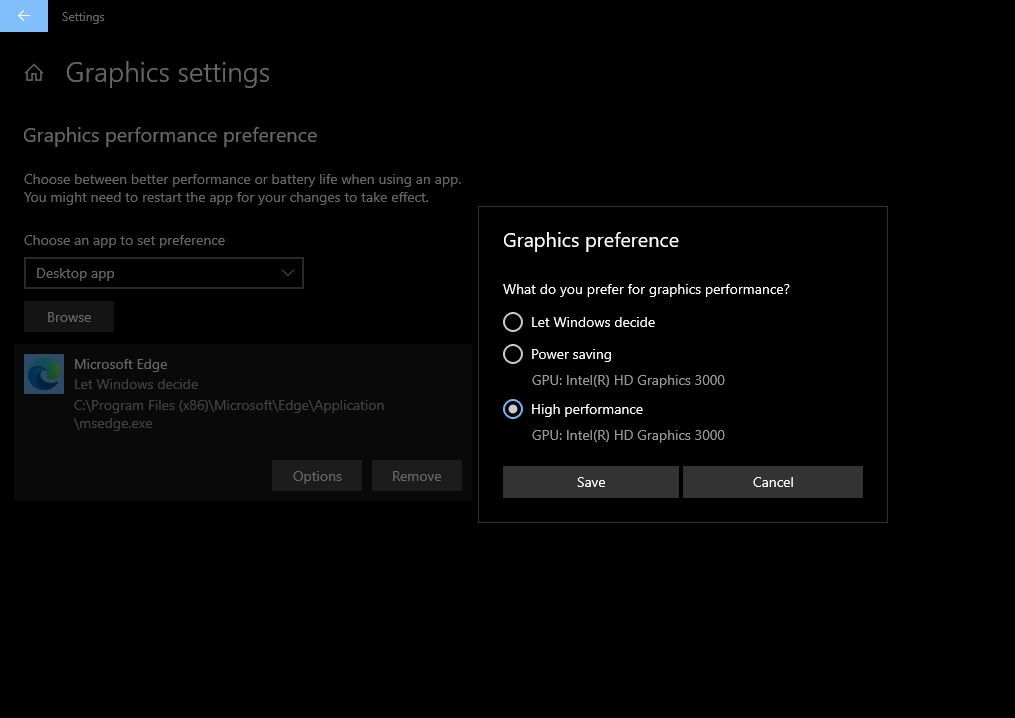
As for selecting the nvidia gpu for edge in windows 10 you'd need to go to Settings -> System -> Display -> Graphics Settings (small writing, towards the bottom) -> then Browse for Edge (if you have shortcut on desktop you can select that).
After you added Edge to that list you can select which GPU should be used for that process. Application restart is needed if it wasn't closed during the GPU preference selection.
Dear Coddy , thanks for your detailed reply. I did the things you said but Intel is the main GPU, I can see playready under about:gpu, but in https://bitmovin.com/demos/drmplayready does not appear, playready appears only in the legacy Edge. (See the attached files)
I had the same problem with Firefox, Chrome, Opera, Brave, Vivaldi and Yandex. But what was interesting is Opera and Yandex worked fine with both mubi.com movies and https://bitmovin.com/demos/drm video (and showing no DRM in the bitmovin website), however, after some hours Widevine got activated and mubi.com videos were stuttering as well as the bitmovin video.
My humble theory is:
- It has nothing to do with direct composition. Because I maniplated Chrome by setting --disable-direct-composition=0 to shortcut and I had direct composition "true", but still the same issue.
- New Edge does not inherit the functionalities of the Legacy Edge (at least in my case/PC).
- New Edge is not supporting Playready on my PC.
- Widevine is blocking the video here : https://bitmovin.com/demos/drm. But when I disable the Widevine I can watch the video in that link without problem, but then I cannot watch the mubi.com movies at all (not even stuttering).
Cheers
Ferhat

 DeletedJun 04, 2020Not applicable
mafein Here is an unofficial list of requirements needed for PlayReady/4k HD to run successfully. It may be possible to circumvent some of these, but this is what our team recommends:
- Update the Microsoft Edge browser to the latest version.
- PlayReady DRM for Windows 10 on edge://flags must not be disabled. See: edge://flags/#edge-playready-drm-win10.
- The https://www.microsoft.com/store/productId/9NMZLZ57R3T7 must be installed.
- The "Use hardware acceleration when available" setting is enabled. See: edge://settings/system.
- The following edge://gpu settings requirements must be met:
- "Compositing" is "Hardware Accelerated".
- "Direct composition" is "true".
- "PlayReady Hardware DRM support" is "true".
- A Windows 10 computer or tablet with the latest Windows updates installed.
- A 60Hz 4K capable display (with HDCP 2.2 connection if external display).
- NOTE: Every monitor connected to your computer must meet these requirements to successfully stream in Ultra HD.
- Intel's 7th generation Core CPU (i3, i5, or i7 models in the 7xxx or 7Yxx series) or newer, or a NVIDIA GPU that meets https://nvidia.custhelp.com/app/answers/detail/a_id/4583/~/4k-uhd-netflix-content-on-nvidia-gpus .
- A steady internet connection speed of 25 megabits per second or higher.
- Streaming quality set to Auto or High.
Fawkes (they/them)
Project & Community Manager - Microsoft Edge Natank05Nov 16, 2024Copper Contributor
I have a question on how you managed to find the "PlayReady Hardware DRM support" is "true".
I cant see at all in edge://gpu/. thats not appearing anywhere for me
- mafeinJun 07, 2020Tin Contributor
Thanks for the response Deleted, but that is a vicious cycle. Chromium Edge disables direct composition due to my GPU, but without this I cannot get Playready enables as per your response. My suggestion playready should be independent of direct composition, if not possible, direct composition should not be disabled due to GPU. Because I do have Playready with my legacy Edge version. My issue is problably that my GPU is incompatible with widevine. By the way I have no issues with watching Netflix movies. The only issue is mubi.com movies and the DASH content here: https://bitmovin.com/demos/drm .
 GirofoxJun 21, 2020Tin Contributor
There is a workaround I found today! Just disable either Widevine DRM or PlayReady DRM in edge://flags like in the images below. Both enabled (default flag is enabled by the way) does not work! And with override software rendering list set to enabled you even get hardware accelerated video decoding. On https://bitmovin.com/demos/drm you can check which one is enabled and below in the images you can see it works flawlessly for both DRM key systems. When you also want to stream 4K Netflix you need the HEVC video extensions from here: https://www.microsoft.com/en-us/p/hevc-video-extensions-from-device-manufacturer/9n4wgh0z6vhq
I get 1080p and over 4000 kBit/s bitrate for the movie snowpiercer in Netflix (view with CTRL + Alt + Shift + Q). Bitrate in Netflix UWP App is even higher and supports 5.1 Dolby sound.PlayReady Hardware DRM supportedge://gpuEdge flags for NetflixWidevine