Forum Discussion

jelle kok
Apr 16, 2019Brass Contributor
Missing news at startpage/tab
Im missing the news option, and the settings.
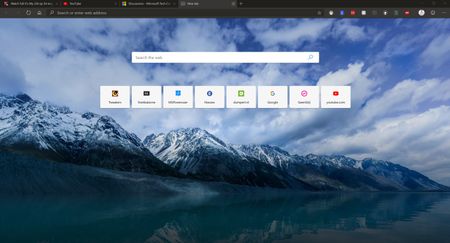
 DeletedApr 16, 2019
Hi
is it possible, you did enabled local new tab through edge://flags?. Go to edge://flags/#use-edge-local-ntp and if this property is enabled, change this enabled value to default.
Deleted
Apr 16, 2019Hi
is it possible, you did enabled local new tab through edge://flags?. Go to edge://flags/#use-edge-local-ntp and if this property is enabled, change this enabled value to default.

Elliot Kirk
Apr 16, 2019Former Employee
Thankn you Deleted for diagnosing this so quickly. jelle kok, did resetting this flag to Default bring back the news feed and settings box? As @Cameron_Bach noted, even when the news feed is active, there isn't any scroll bar.
- jelle kokApr 16, 2019Brass ContributorYes, i can see the option and the news now. (default flag now)
For me there should be a scrollbar of you have enabled news feeds. Now i need to use arrows keys for see more news items.- Cameron_BushApr 16, 2019Steel Contributor
jelle kok There definitely isn't a scroll bar with or without the news feed on. I imagine it's not included to avoid ruining the clean minimalist design of the New tab page. If you're on a laptop you may be able to use arrow keys, page up and down or two fingers on the trackpad at once to scroll.

