Forum Discussion

ScottPreston
Feb 01, 2021Copper Contributor
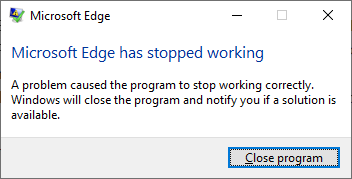
Microsoft Edge Dev Crashing
Latest build of Edge Dev installed but crashes on open. Windows 10 PC.
- Feb 01, 2021That most likely means a user configuration is causing that problem, could be a wide variety of things (an extension, settings in Edge etc.)
because all you did there was making a new profile directory and start Edge from there.
if I were you and had all sync options turned on in my main Edge profile, I would just reinstall Edge dev, because there is a chance that the next update may not be able to fix it since you just launched it successfully.
if you decide to do that, make sure to check the option "delete all user data" when asked during uninstall.

ScottPreston
Feb 01, 2021Copper Contributor
HotCakeX Well that worked to at least open the app. Unfortunately if I try to log in at the top right it crashes or if I try to open the original icon it crashes. I suppose it will hold until a bug fix is in and a new version released.
Microsoft Edge Version 89.0.774.8 (Official build) dev (64-bit)

HotCakeX
Feb 01, 2021MVP
That most likely means a user configuration is causing that problem, could be a wide variety of things (an extension, settings in Edge etc.)
because all you did there was making a new profile directory and start Edge from there.
if I were you and had all sync options turned on in my main Edge profile, I would just reinstall Edge dev, because there is a chance that the next update may not be able to fix it since you just launched it successfully.
if you decide to do that, make sure to check the option "delete all user data" when asked during uninstall.
because all you did there was making a new profile directory and start Edge from there.
if I were you and had all sync options turned on in my main Edge profile, I would just reinstall Edge dev, because there is a chance that the next update may not be able to fix it since you just launched it successfully.
if you decide to do that, make sure to check the option "delete all user data" when asked during uninstall.
- ScottPrestonFeb 02, 2021Copper Contributor
HotCakeX Purging the user data fixed it. I had already tried uninstall but neglected to select that option for some reason. Thanks for the tip!
- HotCakeXFeb 02, 2021MVPYou're welcome 🙂