Forum Discussion

Love the custom keyboard shortcuts for extension actions--impressive and useful!
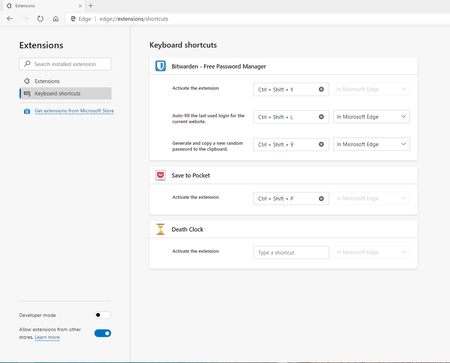

Hi ikjadoon, I am glad that we could surprise you with this feature. I don't know how I missed it in the Release Notes. I will add it in there now.
 audi_2654May 01, 2021Copper Contributor
Hi there,
I'm using Version 90.0.818.49 (Official build) (64-bit) & I just discovered this feature, lol! & I'm loving it!
After you assign a keyboard shortcut for an extension, you have further 2 options to select 'In Microsoft Edge' & 'Global' .
Can you tell me what is the difference between 'In Microsoft Edge' & 'Global' ? I couldn't find anything related to this.
Also I'm not able to use the second right side Alt key but right side Ctrl key works for setting a shortcut. Only left side Alt key of my keyboard works for setting shortcut. Checked my keyboard hardware both left & right side Alt & Ctrl keys are working.- ikjadoonJul 09, 2019Bronze Contributor
Deleted Reallyyyy! That's pretty neat. I used Opera for a while way back in the day and they had some of the best native features: Speed Dial, compression, etc.
Elliot Kirk Oh, what do you know! Haha, I thought it was perhaps a small addition and hadn't deserved a full shout-out, but I didn't think I'd get this "fixed" until the stable channel hit + a few weeks for Bitwarden to get a good look at it (as Bitwarden in Chromium Edge https://help.bitwarden.com/article/auto-fill-browser/).
//
It's really nice to give users more control (i.e., the people actually using hotkeys are the same ones who appreciate more control) 👍
I plopped in the original Firefox hotkey and it worked like a charm. And hopefully more users now will check it out, now that it's in the release notes 🔥
