Forum Discussion

I can't turn off Spell and input auto-correction and it make some annoying bugs in Edge and Edge Dev
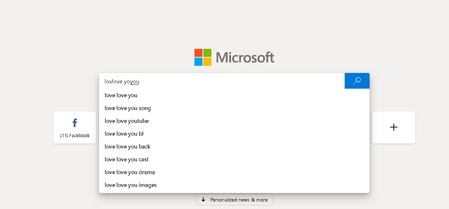

Hi dddn2k, it looks like you are hitting this in the search box of the New Tab Page, is that correct? Are you seeing this same behavior in other portions of the browser, such as the Address Bar? What about other web pages? Thanks, Elliot

Elliot Kirk No man, it happening in all web pages, like typing in FB, Youtube... all portions of browser, strangely it just hitting me in MS Edge Insider Dev (not MS Edge) and in Vietnamese Telex Input Method (even I typing Vietnamese or English), I also turn off all Spell Checking in System Setting and MS Edge Insider Dev Setting but it still happen. With English US and Vietnamese Number Key-based Input Method it doesn't show like that, still underlined my words but not automatically add a whole new word right next to my undone word. It not happen in GG Chrome, another System App too even though I use Vietnamese Telex Input Method. I think this bug caused by some contrariety between Vietnamese Telex Input Method and MS Edge Insider Dev. So I have to use GG Chrome like a temporary plan because I really really love MS Edge Insider, it f__king fast and light, MS did a good job. And one more problem, if I typing faster than the recurrent speed of MS Edge Insider Dev, it show me a mix-up of words like: yoyou anand mme.......... so I cant type fast and this slow down my speed work very much, just a little annoying when I type fast and miss word, I have to backspace all the words. Hope the Developer fix this problem as soon as possible. Thank you very much!