Forum Discussion

jhofferreira
Apr 16, 2021Copper Contributor
How to set Save as Prompt for download (same as Gogole Chrome)?
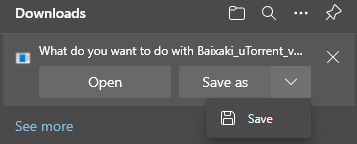
Hello, Microsoft and Community, Until MS Edge 86, the prompt to save a file had two options and its behavior was same as Google Chrome. From MS Edge 87 Microsoft changed prompt function, adding mor...

HotCakeX
Apr 16, 2021MVP
Hi,
it's the new download experience in Microsoft Edge. Chrome is from another company and a different browser.
you have more options in Edge settings: edge://settings/downloads
you can learn more about the new experience here:
https://techcommunity.microsoft.com/t5/articles/introducing-the-new-downloads-experience/m-p/2111551
if you have suggestions on how to Improve Edge's download experience, you can send it using the feedback button on Edge. (shortcut: Alt + Shift + i), that way Edge developers will be able to see them and take them into account.
it's the new download experience in Microsoft Edge. Chrome is from another company and a different browser.
you have more options in Edge settings: edge://settings/downloads
you can learn more about the new experience here:
https://techcommunity.microsoft.com/t5/articles/introducing-the-new-downloads-experience/m-p/2111551
if you have suggestions on how to Improve Edge's download experience, you can send it using the feedback button on Edge. (shortcut: Alt + Shift + i), that way Edge developers will be able to see them and take them into account.
 jhofferreiraApr 22, 2021Copper Contributor
Hi,
Got your point and read this article.About browsers, I know that Chrome is, not only a different browser, but also produced by other company.
Used that browser as example to explain the mechanism. Would like to check if there is any option that I can use Edge download prompt same as older versions.
To tell the truth, I don't understand why I need to do two steps more if I have been selecting Ask me to save file on options list.
Why I have to confirm where I want to save the file if I have set this option on Edge's config?- HotCakeXApr 22, 2021MVPYou can use the browser's feedback button to suggest any changes you want to see,
press Edge's (...) menu button => Help and feedback => Send feedback
that way developers will receive your feedback and consider it- jhofferreiraApr 22, 2021Copper ContributorGreat,
I Will follow your advice.
Thank you so much!