Forum Discussion

How to permanently disable 'Turn off developer mode extensions' popup in Edge?
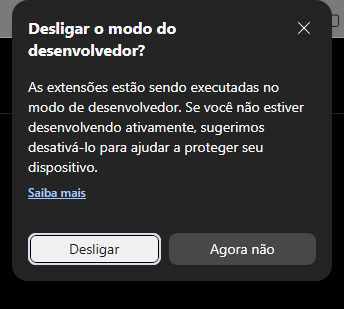

André, the screenshot shows Edge’s developer-extension warning. Your policies address whether development or installation is permitted; they do not document a permanent “trust this unpacked extension” exception to that warning. ExtensionDeveloperModeSettings allows or disallows Developer Mode, while ExtensionInstallAllowlist exempts extension IDs from an installation blocklist.
For extensions you maintain and use daily, the supported distribution route is to package them and submit them through Partner Center to Microsoft Edge Add-ons. You can choose Hidden visibility so the listing is accessed through its listing link rather than search; certification still applies. Install that distributed version and remove the duplicate unpacked copy after preserving its settings.
For organizational deployment, Microsoft also documents self-hosted CRX packages and installation policies, but Windows devices must meet its Active Directory domain requirements; ordinary Entra join alone is insufficient. I cannot confirm a supported Stable-channel registry switch that permanently suppresses this prompt for local unpacked extensions.
- YagamikunNov 10, 2026Tin Contributor
Thank you for the detailed technical breakdown, Jamony.
However, packaging and submitting multiple local/test extensions to the Microsoft Edge Add-ons store—even with 'Hidden visibility'—just to bypass a startup prompt on my own machine is a massive hindrance to a rapid, local development workflow. It adds a layer of bureaucracy and certification wait times that simply shouldn't exist for local testing.
Since Microsoft forces domain-joining requirements for custom CRX deployment policies on the stable channel, advanced users are left with no clean options. This is exactly why I've submitted this to the Feedback Hub. Microsoft needs to understand that developers require a straightforward, legitimate "I understand the risks" toggle or GPO override to trust unpacked local extensions permanently without jumping through administrative hoops.
