Forum Discussion

Geolocation wrong (really wrong) in Edge but correct in Chrome

I have the latest version of Windows 10 Pro version 20H2 with Edge Version 89.0.774.75 (Official build) (64-bit). I also have the latest version of Google Chrome.
Location settings for google.com is enabled on both browsers.
When I type "my location" in Edge it shows NJ (250 miles away from me) and when I type "my location" in Chrome is shows MA (and my correct precise location). Same issue if I go into Google Maps.
Is Edge looking at my IP address, which may be originating via my ISP in NJ, and Chrome reading my precise location from my laptop?
This is very annoying. Any suggestions?
- SkipperGregApr 12, 2021Tin ContributorI did more research into this.
Microsoft Edge determines your location using MAPS, an app within Windows 10.
Go to windows-button and type in "Maps" to open.
MAPS will use your location from your GPS chip on your device but if you have a PC without a GPS chip like me, MAPS will geolocate your location based on your ISP IP address. In my case, it's using a location that might have once been affiliated with my IP address 250 miles away in NJ. This is the exact same wrong location (down to the street address) that Microsoft Edge is using. If I do a "whois lookup" for my IP address I see it's currently referencing 3 neighboring towns to my town in MA. So, I don't know why MAPS cannot properly geolocate my IP address. In any event, Windows 10 gives you a way to change the "default location" in MAPS:
Click the elipse in the upper right, go to settings, and click "change default location."
This can also be accessed by going into Windows 10 settings/location/privacy/location and click "default location." Both methods above (MAPS and W10 settings) do the same thing which is change your default location.
One would think that would fix this problem but it doesn't.
When I go into MAPS it still uses my wrong geolocation.
Furthermore, when I go into Edge (then Google and type in "my location" in the search bar) is still uses that same erroneous location. I tried disabling MAPS permission to use my location so that the correct entered default location would be the only location associated with my PC. When I go into MAPS it shows no location and when I click the location button it says it can't locate my location. When I go into Edge it still shows me the old, incorrect NJ location. When I re-enable the ability for MAPS to access my location then upon going into MAPS I go to that same incorrect NJ location.
So, it seems the Windows 10 bugs are twofold:
(1) the MAPS geolocation is not correct (for me off by 250 miles)
(2) when you enter a "default location" in MAPS it does not over-ride the existing geolocation as it should to fix this problem
There is a link to a fix along the lines of above that will explain this in more detail but, like I said, the fix doesn't work as I tried to describe. But here it is:
https://www.howtogeek.com/264809/how-to-set-your-default-location-for-windows-10-apps/
If anyone knows how to override MAPS "location" with an entered "default location" please let us know.
Otherwise, Microsoft should fix this.
Chrome does not have this problem because they are not using Windows MAPS to determine the geolocation. In fact, they are not doing a geolocation because when I go into Chrome and within google type in "my location" it shows my exact city not the neighboring towns that my IP address is associated with. So, Chrome has the intelligence to associate my location with my profile either as part of my Google account or as a cookie in my Chrome browser. All I know is it works in Chrome but not Edge and that doesn't make Edge look very good. MasobasoJul 28, 2021Copper Contributor
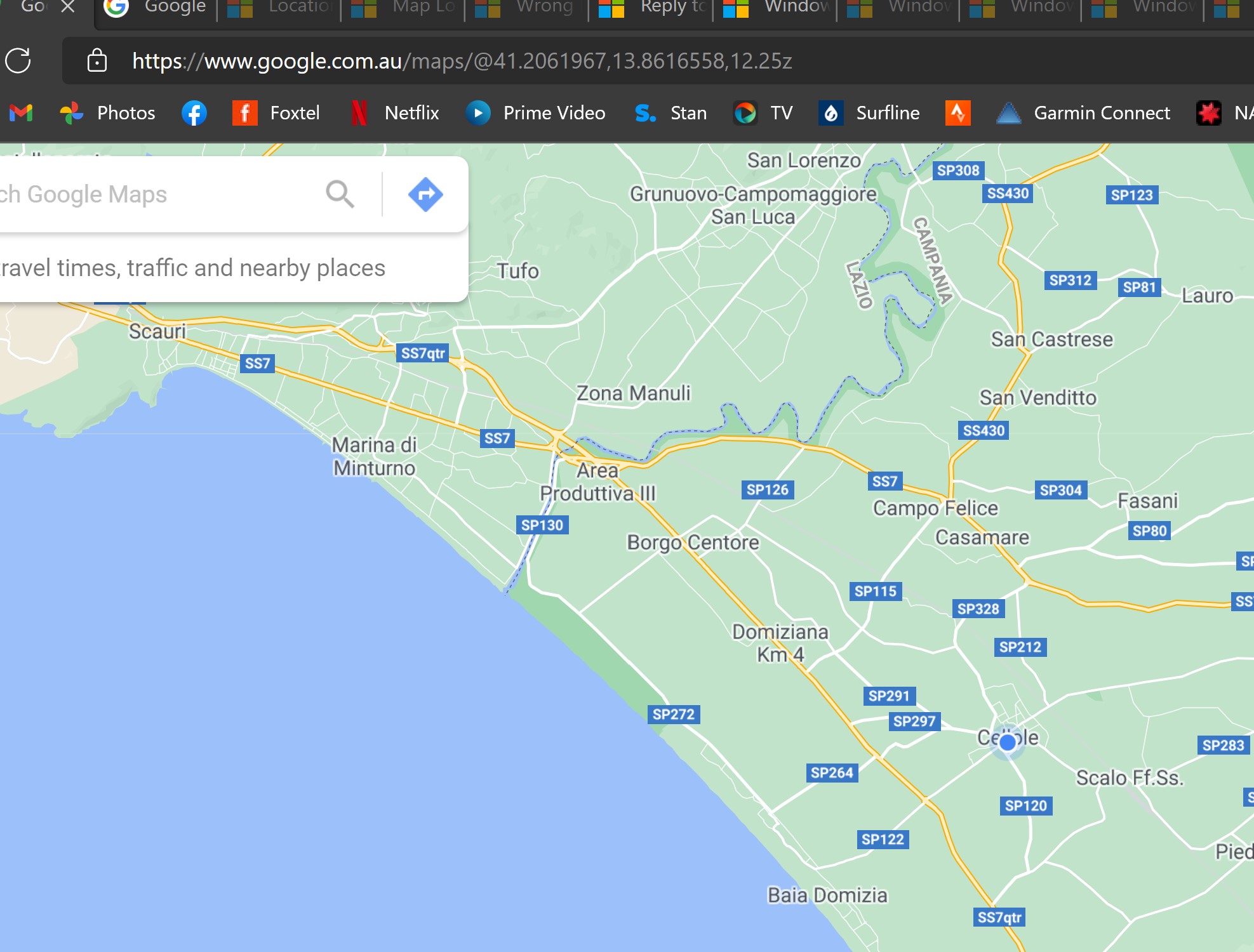
SkipperGreg This is nuts - similar problem which seems to be on Microsoft but location dependent. Bear with me - I noticed my Window time (on auto time-zone) was incorrect. I have travelled up to my parents on the Sunshine Coast in Oz but it was fine when in Brisbane. The auto-time zone was showing Amsterdam, Rome, etc and not Briabsn. So I checked on the location settings and setting the "default" to choose current location and it zoomed the map to a town in Italy. Did the same in Google Maps in MS Edge. But not in Chrome - it went directly to where I am.
So I checked my parents' laptops and exactly the same problem - so it must be the ISP or the wifi router AND how windows/microsoft gathers the location data but NOT Google Chrome. So I tried my mobile hotspot - Same result but the mobile is on the same ISP (Optus).
So, process of elimination, the issue (in my case at least) surely must be a combination of what the ISP is showing to windows.Two screenshots below, one from Edge thre other from Chrome, same action to select location from the map.
I believe the laptop has a GPS (spectre x360).
Then my Dad told me he noticed this a few weeks ago... what can cause this?
 DueydoodahAug 20, 2022Copper ContributorI want to thank you for this insight. I always have issues getting the correct location while I move around the country. Your tip on the time has finally fixed the problems I've been having when using the RV Life Campground website. It has always been haphazard when trying to submit a speed test to post when performing a campground review. Again, I was having this issue when I stumbled upon your note. When I checked my PCs time, it was off by one hour. Once I changed to reflect the proper time, and ensured Maps had the correct location set as the default, the speed test submission found the correct campground. It appears that Windows 11 can't detect the correct location, even when you set the default manually in Maps, unless you also have the correct time/time zone.
- SkipperGregApr 18, 2021Tin Contributor
Although I found no fix to overriding geolocation in Microsoft MAPS, I did find a solution to this problem in GOOGLE.
Go to http://www.google.com, make sure you have given the site permission to access location in your browser (in Edge go to Settings/Cookies and Site Permissions then click on "All Sites" under "Site Permissions" then click on http://www.google.com and make sure "location" is set to "allow), also, make sure you are logged-in to your Google account in the browser (in this case Microsoft Edge).
Next, type in "my location" in the Google search bar.
Then scroll down to the FOOTER of the Google page, and click “Update Location” or “Use Precise Location.”
I had to do this a few times to work. This works on all devices. On my iPhone in Safari it works because it uses the GPS chip for precise location. On my Windows 10 laptop which has no GPS chip, when using Chrome there was never a problem (it knew my correct location by itself) but on Edge when I did the steps above and clicked “Use Precise Location” it changed my incorrect geolocation to what Google knows is my “Home.”
Hence, you also need to make sure Google knows your home or work location. To do that, go to Google Maps and enter your current address then set that to “Home” or “Work.”
This is an awkward workaround in Google to the fact that Microsoft Windows 10 is not using the most accurate geolocation. I suspect this is not uncommon so the real problem is that Windows 10 does not allow setting the “default” location in Microsoft MAPS override the Windows 10 geolocation. That would solve the problem.
The most reliable and consistent solution is for Microsoft MAPS default location to override Windows 10 geolocation for browser location purposes.