Forum Discussion

ckykenken
Aug 07, 2019Copper Contributor
Favourites syncing goes wrong
I got a crap ton of redundant junk whenever I try to sync my favourites using my Microsoft account and I have been tired of deleting them. Is there a way to reset sync details? I have used such featu...
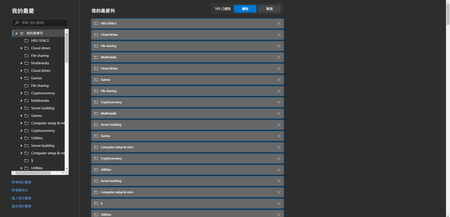
- Aug 07, 2019Reset and remove Microsoft account from all other devices that are using the Edge browser sync (like other Windows OS, phones etc), after that your device will be the only one connected to the Edge sync, now press CTRL + A to select all bookmarks and then press delete, wait some time like an hour and then try to connect other devices (if any) back to the sync and see what happens. that 1 hour should give Microsoft Edge enough time to sync everything with online server, but remember after you delete everything you have to wait 1 hour before adding anything back. I hope they improve performance of the servers soon.
i'd also suggest you to do this on Canary version since it's more recent and has more fixes and updates.

AshutoshK
Jan 03, 2020Copper Contributor
Is there a way to know what all devices are syncing the edge chrome favorites. I have deleted all devices from account.microsoft.com, except the one i am using, but the deleted favorites keep appearing all over again

HotCakeX
Jan 03, 2020MVP
There is no such feature in Edge inside yet. on Firefox I can see my other syncing devices but on Edge I can't.
- AshutoshKJan 03, 2020Copper Contributor
I have no other devices other than the active one on which edge chrome is installed. I have cross checked this at account.microsoft.com. yet when i delete a favourite / or all of them, they just come back
- HotCakeXJan 03, 2020MVPSync servers have been having problems for a while now..unfortunately nothing much to do but to wait for a possible fix..