Forum Discussion

Favourites button does not yet provide access to History and so on as in Classic Edge
- Oct 28, 2019
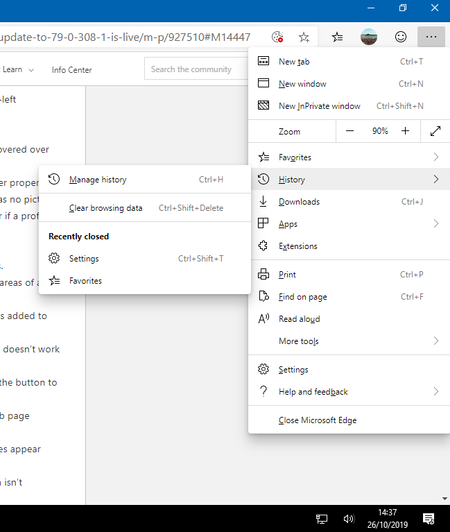
Hi Graham-STMC, browsing history is available using the Ctrl+H hotkey as well as through the settings application. In the currently available version of Microsoft Edge, we have received enough feedback that we made a change to surface browsing history as its own icon on the address bar. So we are trying to understand the need to get to history often enough to add the history button to the main user interface. For some people, it might be, and we would look into addressing that feedback. Thanks - Elliot

Hi Graham-STMC, browsing history is available using the Ctrl+H hotkey as well as through the settings application. In the currently available version of Microsoft Edge, we have received enough feedback that we made a change to surface browsing history as its own icon on the address bar. So we are trying to understand the need to get to history often enough to add the history button to the main user interface. For some people, it might be, and we would look into addressing that feedback. Thanks - Elliot
- Graham-STMCOct 29, 2019Steel ContributorEliott Kirk Thank you. From my own experience it is particularly useful and quick to click the Favourites List button, then the History button if I have previously used the Continue on PC feature from Android, but then wanted to return to that page again on another device after the initial connection has closed. Of course CTRL+H is also a quick option. I wonder how the various keyboard shortcuts could be promoted more easily? My older clients seem only to remember CTRL+C, X, V and P despite my often providing them with a list. For them a visual button on screen is extremely useful, even if it has several features.
 ppnachoOct 29, 2019Iron Contributor
I miss the arrow of IE11 to see the last urls written:
(Echo de menos la flechita de IE11 para ver las ultimas urls escritas:)
- Graham-STMCOct 29, 2019Steel Contributor
ppnacho This still happens in a similar way to it used to on Internet Explorer with Chromium Edge if you click and hold the back arrow. (My example is in Dark Mode.)
