Forum Discussion

favorites bar
How do I turn off the favorites bar on a new tab on edge dev preview?I have tried ctrl-shift-B but it still does not turn off.
11 Replies
- Drew1903Silver Contributor
Cliff,
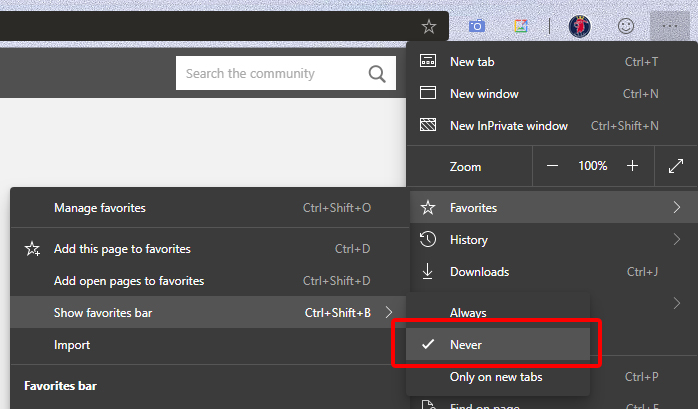
In Dev you can't, at least, not yet. It is doable in Canary, now. This ⬇ is Canary...
Cheers,
Drew- Dennis5mileSilver ContributorThis is now available with the lastest update to Edge Dev.....
Dennis5mile- Drew1903Silver Contributor
Dennis5mile
Ah, Dennis, the sweet smell of progress 😁👍👍
Cheers,
Drew
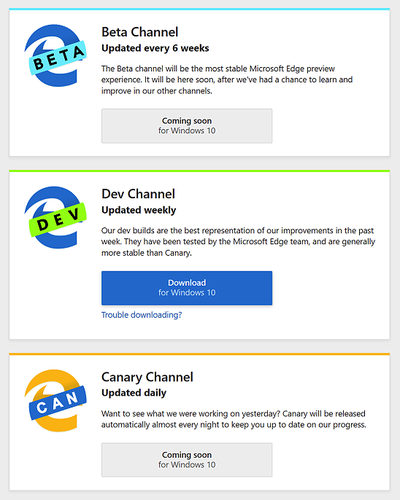
- Drew1903Silver ContributorKeep in mind, only Canary has Never & the other 2 choices. Right now, Dev has show or not & it doesn't affect New Tab... will be there, stay there, even if set to not show, New Tab page is exceptional. Cheers, Drew
- missionaryBrass Contributor
I didn't try the keyboard shortcuts, just used the menu. Selected "Never". It's never returned on any of the available layouts. Try it one more time? cliff1455
 cliff1455Tin Contributor
missionaryyeah it shuts off the favorites bar on all pages but the new tab page.
- missionaryBrass Contributor
- Elliot KirkFormer EmployeeThe Dev build has only the setting on / off. On the latest Canry build there are three options for the favorites bar: Always, Never, and Only on New Tabs. These options will likely show up in the next Dev channel update.
- cliff1455Tin Contributor
Elliot Kirk I've also turned it off with the on/ off button but on the new tab page it still shows up.I really hate the favourites bar.Grr!
- Wade DorrellBrass Contributor
Elliot Kirk Looking forward to the "Never" option for Edge's bookmarks bar. I haven't used bookmarks since Yahoo's web index was the best "search engine." ;-) For years in Chrome I had one or two bookmarks from times I accidentally clicked the star. Every once in a while I bother to delete them and then ugh, that message about importing favorites comes back! Look, message, it's not lack of knowing about importing favorites that causes me to not have bookmarks!
I'd heard Chrome 75 would also have this option to completely hide the bar. Just in time for Edge. :-)