Forum Discussion

Favicons for bookmarks broken since Edge v149 update
 Jul 03, 2026
📣 Update, 3 July 2026:
✔ As of the latest 150.0.4078.48 update, the missing bookmark icons issue is fixed. You can once-again set "browsing history" to clear each time you close Edge, and icons will remain between sessions. 🥳
✔ As of the 149.0.4022.80 update, these issues were resolved:
• "Create QR code for this page" feature works again
• "Browsing history" in the "Clear browsing data" menu isn't always stuck on "Calculating..."✔ As of the 149.0.4022.62 update, these issues were resolved:
• moving the mouse-pointer to the top of the screen when Edge is in full-screen mode once-again shows the tabs and URL bar, and the double-arrow icon appears once-more to allow exiting full-screen mode;
• when users saved files to network-locations (\\server\share\folder), Edge would not open either the downloaded files, or the folder they were saved into; online reports said the .62 update fixed this
🚨 Update: workaround for the favicon issue
After testing, it seems in Edge v149 if you have "browsing history" set to clear each time you exit Edge, this is what causes the favicons to not appear, and also for some existing bookmarks to lose theirs.
To check, go to Menu > Settings > Privacy, search and services > Clear browsing data > "Choose what to clear every time you close the browser" (or enter edge://settings/privacy/clearBrowsingData/clearOnClose in the URL bar, then hit enter to go straight there).
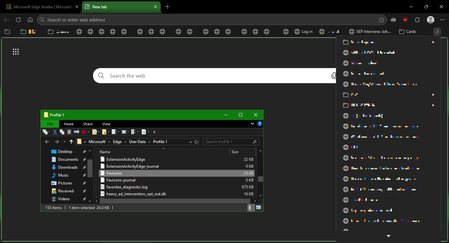
If "browsing history" is enabled there, turn it off (the dot should be on the left) and favicons should then start working. If not, you may need to either (1) close Edge, and delete your current "Favicons" and "Favicons-journal" files, then reboot or (2) create a new profile in Edge (which means having to export your passwords, bookmarks, saved addresses and save payment cards, then reimport them 😬).
Hopefully Microsoft can get this sorted, either by restoring the pre-v149 behaviour, or by adding a new "keep favicons when clearing browsing history" option, as currently the workaround means having to keep your browsing history recorded. However, you can clear this (from the Edge menu, click "Clear browsing data" and then set time-range to "All time" and make sure "Browsing history" is checked; it's up to you if you wish to check any other options there), and from my testing, the favicons do not disappear. It is only if you ask Edge to clear the browsing history when you exit the browser that causes the issue.
💡 To find where your Edge profile is located, type edge://profile-internals/ in the URL bar, then press ENTER. Then click on the "Default" or "Profile 1" heading, then look next to "Profile path". In that folder is where you should find the "favicons" and "favicons-journal" files you can delete. Make sure Edge is fully-closed first, and I'd also suggest doing a reboot after deleting them.
💡 If you have more than one profile, tap the profile icon in the top-right to see which you're currently using.

This makes sense. After they all disappeared the other day, they began to come back after I opened a saved website. Last night I needed to do a reimage of the OS drive so I closed Edge and all other apps. this morning all the favicons were gone again. I had Edge clear history on shutdown. I turned that off as above and the icons that were populated yesterday reappeared. Go figure.