Forum Discussion

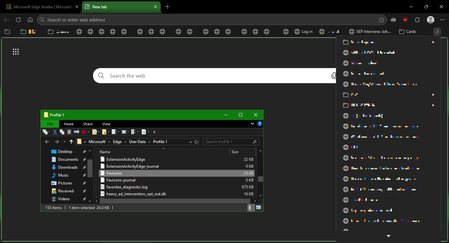
Favicons for bookmarks broken since Edge v149 update
 Jul 03, 2026
📣 Update, 3 July 2026:
✔ As of the latest 150.0.4078.48 update, the missing bookmark icons issue is fixed. You can once-again set "browsing history" to clear each time you close Edge, and icons will remain between sessions. 🥳
✔ As of the 149.0.4022.80 update, these issues were resolved:
• "Create QR code for this page" feature works again
• "Browsing history" in the "Clear browsing data" menu isn't always stuck on "Calculating..."✔ As of the 149.0.4022.62 update, these issues were resolved:
• moving the mouse-pointer to the top of the screen when Edge is in full-screen mode once-again shows the tabs and URL bar, and the double-arrow icon appears once-more to allow exiting full-screen mode;
• when users saved files to network-locations (\\server\share\folder), Edge would not open either the downloaded files, or the folder they were saved into; online reports said the .62 update fixed this
Just had an update to Edge, and it's now on version 149.0.4022.62, and the missing favicon issue is still present.
These are also other known-issues with the v149 release:
Cannot open files saved on a network-path: if you download a file directly to a network location (\\server\sharename\folder-path) then Edge errors when you try to open the file, or open that folder
Create QR code for this page not working: after clicking that option on the right-click menu of any webpage, nothing happens
History cannot be cleared: when you bring up the "Clear browsing data" dialog, the "Browsing history" item at the top is stuck on "Calculating..." and never completes
History not showing all entries: people report their history is only showing a few days or a week's worth of sites, not the number of days it is set to record for
Tracking Protection in "balanced" mode may not be as effective as v148 and earlier: some reports of users claiming Edge v148 seemed to block more ads and trackers (though the "strict" setting seems unaffected)
Window controls no-longer accessible in full-screen mode: it used to be possible to move the mouse pointer to the top of the screen when Edge is in full-screen and use the "restore" control to exit; now the window controls never show, so only pressing ESC twice, or F11 once, can exit full-screen
Not-sure if Microsoft switched to vibe-coding for this v149 release, but it does seem rather buggy...