Forum Discussion

Favicons for bookmarks broken since Edge v149 update
 Jul 03, 2026
📣 Update, 3 July 2026:
✔ As of the latest 150.0.4078.48 update, the missing bookmark icons issue is fixed. You can once-again set "browsing history" to clear each time you close Edge, and icons will remain between sessions. 🥳
✔ As of the 149.0.4022.80 update, these issues were resolved:
• "Create QR code for this page" feature works again
• "Browsing history" in the "Clear browsing data" menu isn't always stuck on "Calculating..."✔ As of the 149.0.4022.62 update, these issues were resolved:
• moving the mouse-pointer to the top of the screen when Edge is in full-screen mode once-again shows the tabs and URL bar, and the double-arrow icon appears once-more to allow exiting full-screen mode;
• when users saved files to network-locations (\\server\share\folder), Edge would not open either the downloaded files, or the folder they were saved into; online reports said the .62 update fixed this
I've tested this inside a virtual-machine which is running Windows 10 Home 22H2 x32 (OS Build: 19045.6456), which is the 32-bit kernel version and has the final (2025-October-14) public update installed and I was able to replicate the same issue.
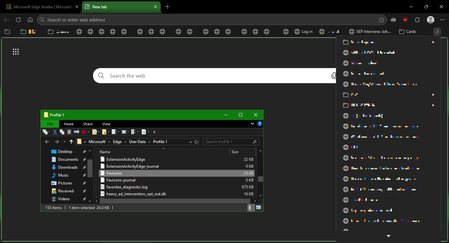
Before Microsoft Edge had updated, I created some test bookmarks, and opened-and-closed Edge (ensuring the "Allow Edge to continue running in the background" setting is set to "no", so it is fully-closed in-between tests), and the favicons all remained:
But after it updated to the latest v149 release, some of the favicons broke, and even though you can see Edge has pulled the favicon successfully from the site to display it in the tab, the bookmark does not get updated and remains broken:
I've checked with some family members and friends who are on Windows 11 and none seem to be reporting losing bookmark icons as of now, and they have checked in the Edge settings they are on the v149 release, so maybe this is only broken for Windows 10 users?

Same issue on Win 11 Pro, so not an OS issue. It's most likely upstream and is caused by a pipeline stalling rehydration of the local DB. A sync issue between the local and cloud DB. // No fix I am aware of, but I can say it is not an issue in Edge 150.x via the dev channel, so just wait for an update out of 149.x.