Forum Discussion

Extension installation errors...
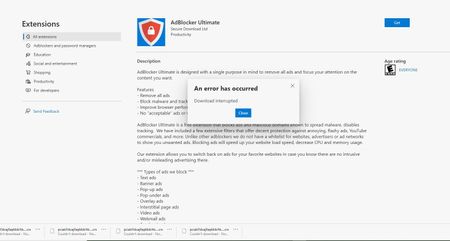

Ok, I still can not down load/install this "one" extension.
Error on bottom in the download bar reads "Couldn't downlaod No File"....
HotCakeX I do have the latest version "Version 78.0.259.0 (Official build) canary (64-bit)" and Thanks for testing to see if you had any problems, and it does have the .crx , and so far what I've done to see if I can find the problem is one by one disable all the 24+ flags I had enabled. Even with "NO" flags enabled this extension will not install and keeps giving the same error. I have all 3 Edges, Edge Beta, Edge Dev, Edge Can and only the Edge Beta was I able to install this Extension with several flags enabled and setting tracking protection to strict. I am not able to install it on Edge Dev nor on Edge Can... I have sent smileys on this problem.. Will keep trying unless the Team has figured it out already and putting in the fix with todays Can update...
Dennis5mile
- HotCakeXAug 29, 2019MVP
You're welcome,
I did install that too now, no problem. adblocker ultimate, on canary latest version.
as you can see i have collections there so it can't be beta.
Version 78.0.259.0 (Official build) canary (64-bit)
looks like it's only related to your browser. you can either wait it out or delete your user data folder for canary and refresh your browser. you won't lose anything with cloud sync, as for your history you can also back it up manually.
- Dennis5mileAug 29, 2019Silver Contributor
Ok, one slight detour.... How did you get "OneNote" I see the icon on your toolbar..

Inquiring Minds wanna know??
Dennis5mile
- Dennis5mileAug 29, 2019Silver Contributor
Still can not download/install with this latest version of Can Version 78.0.261.0 (Official build) canary (64-bit).. Waiting on response to feedback sent into team...
Dennis5mile
