Forum Discussion

Edge, Webcam, and Anti-virus Software

how else the About page would try to access web cam, doesn't make sense. btw Beta is not so up to date now, try Dev or Stable

HotCakeX wrote:
Maybe it's a Norton problem? that's possible..
how else the About page would try to access web cam, doesn't make sense. btw Beta is not so up to date now, try Dev or Stable
Using the stable version, I went through the same series of steps to clear the cache and others as mentioned previously. I got camera message again using various Edge pages, including the about page. I agree that it does not make sense.
Regarding Norton, I certainly can't vouch for the software, so it is possible that it is Norton and not Edge. Intuitively, I would think that it should be easy to monitor for calls to the camera. And that's what Norton is picking up. Again, I am neither a Symantec nor a Microsoft developer, so all this stuff is beyond me. I just know as a user that I see warning messages that make me uncomfortable.
- HotCakeXFeb 14, 2020MVPI found these:
https://community.norton.com/en/forums/how-turn-safecam-notifications-norton-360
apparently others are having similar problems
https://community.norton.com/en/forums/safecam-alerts-bing- KStecykFeb 14, 2020Brass Contributor
I noticed that the links you provided were to issues identified back in August and September of last year in 2019.
The solutions were to disable Windows from using the camera. And in one instance, disabling Norton from displaying the notifications.
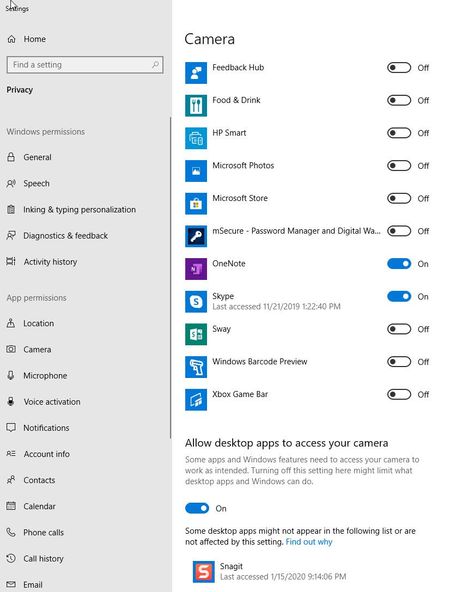
I went ahead and disabled my camera in Windows. Please see graphic below.
So now I have turned off the camera.
Using the Beta version of Edge, I cleared the cache and others for all time, as I indicated in one of the very first posts. And when I went to Edge About, there were no issues. I am using the Beta version so that I don't lose all my settings on the stable version. Both versions exhibit the same behavior of causing Norton to notify me of Edge wanting access to my camera.
But this solution seems to me to be using a sledge hammer to address a small problem. Why should users have to resort to such drastic measures? Even more importantly, if Edge was asking for access to users' cameras, then most users would want to know why.
I have a hunch that Edge just checks to see if it can access the camera should be it required. Even so, it is disconcerting.
- HotCakeXFeb 14, 2020MVPWell if you ask me I'd say try another AV and see if it also constantly prompts for Web cam access.
if you're not sure which one to try, this channel has lots of useful stuff about it, he's a security expert, compares AVs and puts them in real life test
https://www.youtube.com/channel/UCKGe7fZ_S788Jaspxg-_5Sg
you don't necessarily need to buy, almost all AVs offer free trials