Forum Discussion

Edge SxS Folder
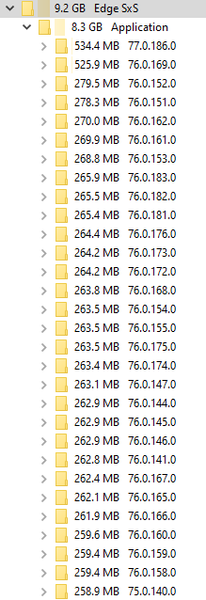

Yes, it should be completely find to delete the older versions. But before you do, if you would, please share your updater and install logs. You can find them in the following places (some may be missing):
%ALLUSERSPROFILE%\Microsoft\EdgeUpdate\Log\MicrosoftEdgeUpdate.log%LOCALAPPDATA%\Temp\MicrosoftEdgeUpdate.log%TEMP%\msedge_installer.log%SystemRoot%\TEMP\msedge_installer.log
Thanks for trying Edge!
--Lee
 BumSkullJun 21, 2019Iron Contributor
leehu I had uninstalled both Dev and Canary and reinstalled as directed by support when I opened a case with them.
The only file I have is the msedge_installer.log file which I posted a few lines from that file before.
- leehuJun 21, 2019Former Employee
BumSkull Re: the log. Sorry missed the log lines posted previously. Nonetheless getting the full log gives a history and phasing of what may be keeping the files open so if you have those to share in the future please do. But you did a nice job on honing in on what seems to be the issue -- thank you.
Looks like you're developing with WebView and that the webview app is keeping parts of edge locked. Can you confirm? Keeping these old files is not desired behavior, but is a new feature and the WebView team is still working out the kinks.
Thanks much,
-- Lee
