Forum Discussion

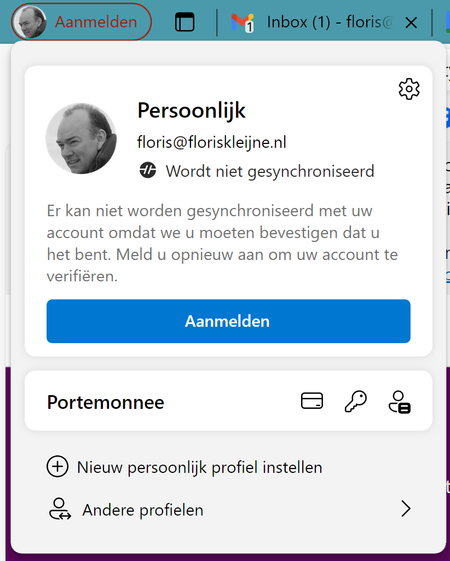
Edge keeps signing me out
 May 17, 2024
florismkleijne HP Elitebook laptop, Windows 11 (language Norwegian), changed from 365 work account to personal 365 account earlier this year. Login to Windows with personal account. Had this problem with Microsoft Edge signing me out all the time.
Possible solution: Opened Settings, Accounts, Login options, deleted all Hello options (face recognition, finger print and PIN). Recreated these Hello options. I guess there was a connection to my earlier work account in these settings. After restart of laptop there is no problem with Edge signing me out (so far so good day at one). Will report back later this week.

https://support.microsoft.com/en-us/account-billing/how-to-use-two-step-verification-with-your-microsoft-account-c7910146-672f-01e9-50a0-93b4585e7eb4

it does not fix the issue.... its not a version thing or ANYTHING, its a wide known issue with the account and nothing else... its either a cookie issue or an issue with windows hello, bc on linux, edge cant access windows hello or the windows account stuff so it doesnt happen there, on windows it happens on all microsoft apps that access the account information by linking the microsoft account internally saved on the windows profile. Only fix would be using a local account and not logging into anything, which makes it an offline machine. Just writing this to make sure microsoft employees dont think this is fixed in any way...
- computerdave911Sep 09, 2024Brass Contributori also see issue where linux can break your Microsoft account Credentials, i would not use linux with a microsoft account,, linux is not secure its free for god sakes, lol
- computerdave911Sep 09, 2024Brass Contributor
what have you tried,, i fixed with edge repair,,then it did some update fixed long ago for me, only on win 10,, never had issue on win 11,, did you try the steps in this youtube from 2 years ago,,
even i did clean install and no fix, as it did not update edge till i did repair,, do you know where the repair button is,, its in controll panel , programs/features , right click edge like you are going to uninstall it , but only option is to click change,, click that then repair,,, if no go , your next comment list,, your operation system and version, and edge version number and also did you try on other computer, as i log into 10 different computers with my microsoft account , and it only happened on 1 win 10 pc,, so not issue with my account , its the computer,,https://www.youtube.com/watch?v=h4UPta_GH4Y