Forum Discussion

florismkleijne
Feb 24, 2024Brass Contributor
Edge keeps signing me out
Since a week or two, Microsoft Edge signs me out of my MS account. The top left account menu shows orange lettering, and when I click it, it reports that it can't sync because it needs to confirm...
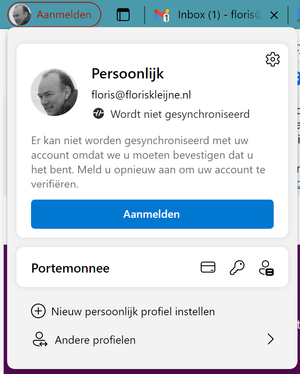
 May 17, 2024
florismkleijne HP Elitebook laptop, Windows 11 (language Norwegian), changed from 365 work account to personal 365 account earlier this year. Login to Windows with personal account. Had this problem with Microsoft Edge signing me out all the time.
Possible solution: Opened Settings, Accounts, Login options, deleted all Hello options (face recognition, finger print and PIN). Recreated these Hello options. I guess there was a connection to my earlier work account in these settings. After restart of laptop there is no problem with Edge signing me out (so far so good day at one). Will report back later this week.

PtrkHrnk
Jun 03, 2024Copper Contributor
Same issue. Edge, recently OneNote (store app) – Windows 10
 TavernightJun 10, 2024Copper Contributor
f it. Im switching to firefox
 vlad_8011Jun 10, 2024Copper ContributorMy man.. I have tried Vivaldi, now i'm trying Firefox, while still keeping Brave as plan B (no pun intended). I see a lot of problems with Firefox. I was using it ages ago, but dont remember it had problem with TABS. Every tab open, it is in the first plan, not in the background (PC), on mobile, every link open in new tab. Also videos on Youtube are freezing very often (only sound continue to work). As for Tabs issues, its long standing issue according to bugzilla and forums. I know it will be the only browser not using that V3 manifest, but they really have to fix a lot.