Forum Discussion

florismkleijne
Feb 24, 2024Brass Contributor
Edge keeps signing me out
Since a week or two, Microsoft Edge signs me out of my MS account. The top left account menu shows orange lettering, and when I click it, it reports that it can't sync because it needs to confirm...
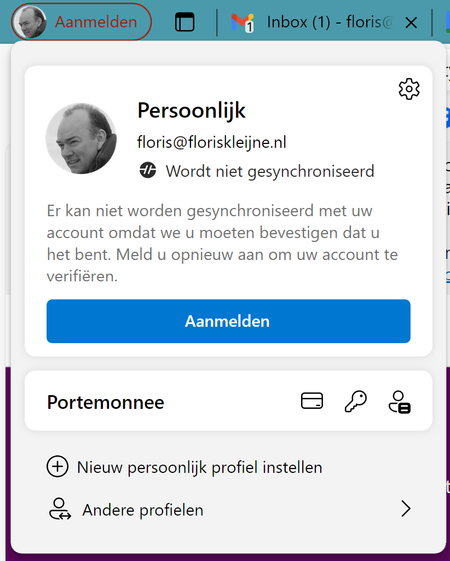
 May 17, 2024
florismkleijne HP Elitebook laptop, Windows 11 (language Norwegian), changed from 365 work account to personal 365 account earlier this year. Login to Windows with personal account. Had this problem with Microsoft Edge signing me out all the time.
Possible solution: Opened Settings, Accounts, Login options, deleted all Hello options (face recognition, finger print and PIN). Recreated these Hello options. I guess there was a connection to my earlier work account in these settings. After restart of laptop there is no problem with Edge signing me out (so far so good day at one). Will report back later this week.

florismkleijne
May 01, 2024Brass Contributor
Do nothing. Clearing out Credentials Manager helped for a few days only. What I did was clear out everything Microsoft, but as I said, that helped for only a little while.
What did help was the ISO-based reinstall of Windows, which seems to have fixed both this problem and the other problem I had (Windows Security wouldn't open). This reinstall is easy and painless, it keeps all your apps and settings intact.
What did help was the ISO-based reinstall of Windows, which seems to have fixed both this problem and the other problem I had (Windows Security wouldn't open). This reinstall is easy and painless, it keeps all your apps and settings intact.

ramonpercina
May 02, 2024Copper Contributor
That's not going to happen; the PC cannot be turned off. (iam not an insider)
Does MS know about this issue?
- florismkleijneMay 03, 2024Brass ContributorGood question, I don't know whether MS is aware.
The other bad news: my Windows 11 reinstall did resolve the other issue, but signing me out in Edge and Office came back today, after only three days without it.- florismkleijneMay 05, 2024Brass ContributorThe in-place reinstall of Windows 11 helped for only a few days. I performed the reinstall on Tuesday; on Friday, this problem came back.
Summarizing the known symptoms so far:
1. Often, usually immediately after starting Windows, or after Sleep mode, my Edge profile gets signed out, as described in the OP.
2. Often, at the same time, Office applications also report a problem with my account: "Your account cannot be opened right now. Sign in again to resolve the issue." (Or some such words; I have the Dutch version of Windows.)
3. Signing back in again NEVER requires my password or MFA, it can be done by clicking two or three times.
4. Signing back in needs to be done in Edge and Office separately; once I've signed back in to one Office app, the problem is fixed for all Office apps.
Rounding up my efforts so far, things that I've tried that didn't resolve the issue include:
1. Edge - Settings - Profiles - Profile settings - Automatic sign-in
Didn't do anything (was already set)
2. Control Panel - Credentials Manager - remove all Microsoft credentials
Helped for only a few days
3. Delete "%UserProfile%\AppData\Local\Microsoft\Edge\User Data"
Helped for only a few days, caused a lot of hassle
4. Reinstall Windows 11 (in-place, retaining docs, apps & settings)
Helped for only a few days (did resolve the other definitely-not-related issue "Windows Security won't open")