Forum Discussion

Edge Icon Display & Search Suggestions
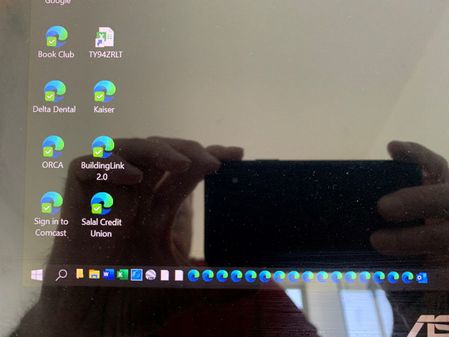

Helloronha365
It's implemented in Edge version 83 (Canary channel), Stable channel is currently on version 80, so it has to wait until it reaches 83 and then it will get the same feature.
however if you want you can try it right now
maybe it will fix your icons problem as well

I fixed the Search problem that only worked when I ran Edge and not when I ran it by starting it by running a website. I had to change Settings - Apps - Default Apps - Web Browser to be the Canary version.
- HotCakeXApr 06, 2020MVP
ronha365 wrote:I fixed the Search problem that only worked when I ran Edge and not when I ran it by starting it by running a website. I had to change Settings - Apps - Default Apps - Web Browser to be the Canary version.
you didn't use that newly added option in Canary?
because the lack of such option seemed to be your problem..
- ronha365Apr 08, 2020Brass Contributor
Thanks for all your help. Just to summarize, I installed the Canary version of Edge and enabled edge://flags/#edge-local-providers-toggle, and then disabled “Show me suggestions from history, favorites and other data on this device using my typed characters” in Edge Settings. I also had to change Settings - Apps - Default Apps - Web Browser to be the Canary version since loading Canary did not delete the old version nor assign it as the default app.
I did not have any luck displaying the correct icons in my Toolbar.
 DeletedApr 08, 2020
ronha365 Thanks for submitting feedback! I've been in touch with the product team regarding the situation with your icons, and I will let you know if they have any insights to share. In the meantime, please let us know if this changes as we push the next few versions of Canary.
Fawkes (they/them)
Project & Community Manager - Microsoft Edge