Forum Discussion

Edge Icon Display & Search Suggestions
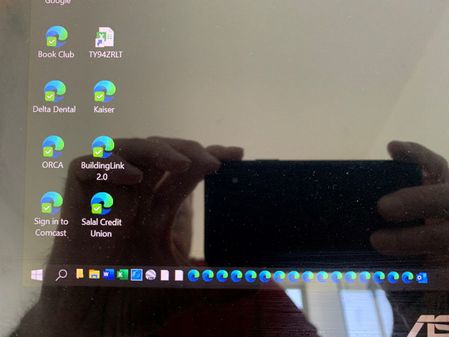

ronha365 Thanks for reaching out, and welcome to our Microsoft Edge Insider's community!
We're sorry to see that you're encountering some issues with those taskbar icons. We'd love to help you with some troubleshooting. If you haven't yet, could you please:
- Submit detailed feedback through the browser, along with diagnostic data and/or that picture?
- Check if this same thing happens in Beta and Canary? (HotCakeX added a link in their comment)
-
Try removing the icons from the taskbar and opening their shortcuts? (We're looking to see if it would re-add the shortcuts to the taskbar)
Thanks,
Fawkes (they/them)
Project & Community Manager - Microsoft Edge
 ronha365Apr 06, 2020Brass Contributor
Deleted
I am talking about the TOOLBAR not the Taskbar. I have created my own Toolbar and selected it to be displayed. I did try what HotCakeX suggested using More Tools - Pin to Taskbar and the icon there shows up fine.
- ronha365Apr 06, 2020Brass Contributor
Deleted
I sent feedback through the browser and included a picture. The icon problem happened with the release version and the Canary version. Not sure what you mean by "Try removing the icons from the taskbar and opening their shortcuts? (We're looking to see if it would re-add the shortcuts to the taskbar)"? I did drag the icon from the taskbar to the desktop and then ran it from the desktop and then closed it. No change to icon.