Forum Discussion

AlexB
Nov 03, 2023Iron Contributor
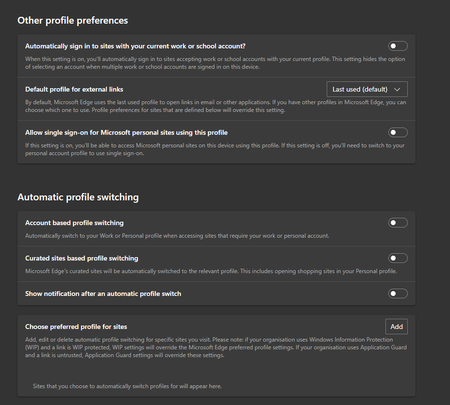
Edge forcing switch profiles when using any .local domain or IP address
I've noticed this today after upgrading to Windows 11 23H2, personal profile that can access local network devices like CCTV systems, monitoring, etc... Always get switched to work profile. Any other...

kedare
Nov 24, 2023Copper Contributor
Any idea of how to set this on others OS ? Like MacOS or Linux, as we have no registry, I suppose the policies are defined in some kind of file ?

DaCarming
Nov 25, 2023Copper Contributor
On MacOS the policy is configured via XML. The key for MacOS is below the Windows info in the link I shared earlier: https://learn.microsoft.com/en-us/deployedge/microsoft-edge-policies#switchintranetsitestoworkprofile
You'd have to put that key/value in a .plist file like this: https://learn.microsoft.com/en-us/deployedge/configure-microsoft-edge-on-mac
As far as Linux, I couldn't find anything in the MS Edge docs, but I found this post that shows doing it via creating a JSON file in a specific location: https://techcommunity.microsoft.com/t5/discussions/global-profile-configuration-on-linux/m-p/2432228/highlight/true#M47993
Hope that helps!
You'd have to put that key/value in a .plist file like this: https://learn.microsoft.com/en-us/deployedge/configure-microsoft-edge-on-mac
As far as Linux, I couldn't find anything in the MS Edge docs, but I found this post that shows doing it via creating a JSON file in a specific location: https://techcommunity.microsoft.com/t5/discussions/global-profile-configuration-on-linux/m-p/2432228/highlight/true#M47993
Hope that helps!