Forum Discussion

Edge Chromium Dev now unsupported by Google Docs
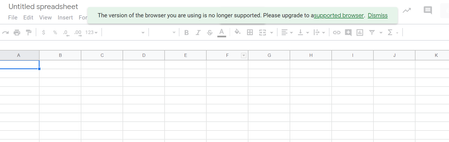

ianwuk Yes, I get the same message with 139.1 but if I dismiss the message everything seems to work without a problem. Entering data and having the sheet saved to Drive, etc.
Regards
Eric

Could we not use a Chrome extension therefore to force change the user agent string?
If so, what would be the updated user agent string to use?
Thanks!
- Eric__WApr 29, 2019Brass Contributor
ianwuk An extensioin like User Agent Switcher would probably work in Edge C. As to the actual user agent string I don't have the expertise to type it out but the extension usually has built in strings to choose from. I would think one that says it is Chrome 69 would work. That is what I used in Opera to fool a financial site that didn't like Opera.
Regards
Eric
- ianwukApr 29, 2019Iron Contributor
Hi Eric.
I did try such an extension but, like you, I didn't know the latest user agent string to use for Chrome. So, no matter what I tried, I couldn't get the message about Edge Chromium being unsupported to go away.
Update for you Eric__W I seem to have fixed it for now:
1 - Install User Agent Switcher from the Chrome Web Store https://chrome.google.com/webstore/detail/user-agent-switcher/clddifkhlkcojbojppdojfeeikdkgiae
2 - Edit the Google Chrome Windows user agent string to be:
Mozilla/5.0 (Windows NT 10.0; Win64; x64) AppleWebKit/537.36 (KHTML, like Gecko) Chrome/73.0.3683.86 Safari/537.36
3 - Set the option inside the User Agent Switcher extension to remember the selected user agent at start-up.
Regards.