Forum Discussion

Edge can't use the mic in the Google Translate page
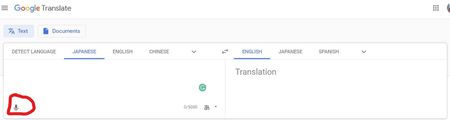
 Jan 13, 2020My guess is that all these Tools use the WebSpeechApi which only works on Google Chrome/Chromium (at least the recognition part) because Google uses it's own cloud servers for the audio transcription. Since the new Edge is basically Chromium it probably thinks that the WebSpeechApi is supported and breaks. The API behaves very strange currently in Edge.

web.skype.com works fine. Try google.translate.com and see if your mic works.

Ok, after I remembered to allow the mic, I tested both in Chrome and Canary Edge.
It worked in Chrome, but not in Edge.
Sorry I couldn't help, but at least confirm the bug.
Maybe it has something to do with thedge://version/ the translator expected?
I don't know.
- NicolSDMay 15, 2019Steel Contributor
Deleted Confirming the bug is just as important at this point in the process. It gives Microsoft an idea of the extent of the problem.
- AnonymousMay 17, 2019
I did some more troubleshooting.
I just tested the Windows key + <H> hot key function (Text to speech) and that works.
But using the OS's embedded controls; isn't the same as using the sites embedded controls.
Still it's an option/work around until this gets fixed.
Specially if one has a gaming mouse that can use macros.
- NicolSDMay 17, 2019Steel Contributor
Deleted Good job, Cliff, except that it only listens for English. With Google's translate mic, you can speak in a foreign language.