Forum Discussion

Dev build unable to sign into HBO GO (Chrome, Firefox, and classic Edge all work perfectly)
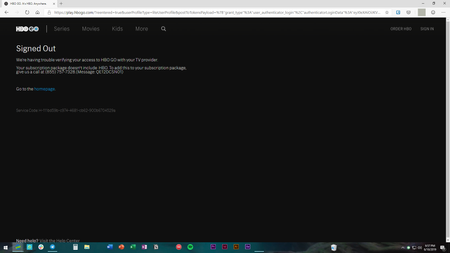
- Jun 19, 2019
I've figured it out! I'd cleared cookies on hbogo.com, but those are not the only cookies HBO stores!
To fix this issue (if you get it):
- Go to Edge's Settings
- Go to Site Permissions on the left menu
- Open the Cookies subpage
- Click "See all cookies and site data"
- Type in "hbo" and remove anything HBO related: auth.hbo, hbogo, hbo.com, hbola, etc.
Refresh the HBO GO home page and voila, it will properly redirect this time!

Allowing redirects does not fix this issue, unfortunately.
Did enabling redirects fix this bug for you? Or was that a general suggestion?

ikjadoon wrote:Did enabling redirects fix this bug for you? Or was that a general suggestion?
(1) No, because I don't have the problem*; (2) Yes - it just seemed so obvious that if redirects were disabled, your redirect would most probably fail. Not everyone finds all these esoteric settings, so I was just trying to be helpful.
* I had to google HBO to find out what you were talking about. I've never lived within miles of a cable network!
- ikjadoonJun 11, 2019Bronze Contributor
Ah, no worries. I wanted to make sure I got what you were saying.
Technically, you don't need a subscription to see the bug. Clicking any provider here should automatically fail with that error, if this is a genuine bug and not just something weird on my system: https://play.hbogo.com/login
I appreciate the help. I've tried on two systems, but both immediately spring the error. Perhaps a re-install will help.
- ikjadoonJun 19, 2019Bronze Contributor
I've figured it out! I'd cleared cookies on hbogo.com, but those are not the only cookies HBO stores!
To fix this issue (if you get it):
- Go to Edge's Settings
- Go to Site Permissions on the left menu
- Open the Cookies subpage
- Click "See all cookies and site data"
- Type in "hbo" and remove anything HBO related: auth.hbo, hbogo, hbo.com, hbola, etc.
Refresh the HBO GO home page and voila, it will properly redirect this time!