Forum Discussion

Deleted
Sep 25, 2019Delete specific websites directly from Omnibox
As you type in omnibox the browser suggests several sites you have already visited that are stored in history. I often see the need and opportunity to delete any of these sites, and it would b...
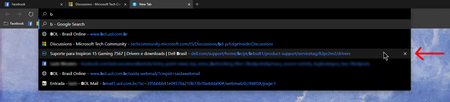

HotCakeX
Oct 08, 2019MVP
Hi,
on Canary Version 79.0.297.0 (Official build) canary (64-bit),
the past history in the omnibox drop down menu can't be right clicked nor deleted using any buttons or keys.
only way is to delete them from the browser history
on Canary Version 79.0.297.0 (Official build) canary (64-bit),
the past history in the omnibox drop down menu can't be right clicked nor deleted using any buttons or keys.
only way is to delete them from the browser history

Elliot Kirk
Oct 08, 2019Former Employee
HotCakeX, Jacques Van de Meerssche, ikjadoon, I just tried this on my Canary 79.0.297.0, and was able to delete the sites that were in the suggestion list due to my history. Sites that have the magnifying glass icon, do not appear to be capable of deletion. I will check with the owner of Search, but it looks like you can still delete some of the suggestions from the search bar. I haven't verified that they have been removed from my browsing history, but they don't show up in subsequent searches that I have done. Thanks - Elliot