Forum Discussion

Delete specific websites directly from Omnibox
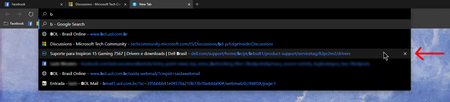

ikjadoon This trick doesn't seem to work for me. I am trying to remove some legit websites but mainly some typos that I made at one time or another. Highlighting the item suggestion in the omnibox and hitting Shift/Delete does nothing at all.
Version 79.0.294.0 (Official build) canary (64-bit)
Windows 10 version 1909
O.S. build 18363.388

Oh, that's really weird. I'm on dev 79.0.287.3, so a few builds behind your canary, and it's still working here. A regression perhaps? Or something else perhaps using that shortcut?
If anyone on Canary can test, that'd be helpful.
But, yes: there really should be a mouse-based menu for this. A simple right-click context menu would definitely go far and hopefully alleviate where now, we can't even tell why it's failing. 😞
- leopeva64-2_Oct 07, 2019Iron Contributor
ikjadoon Yeah, something like this would be nice:
- Jacques Van de MeersscheOct 07, 2019Steel Contributor
ikjadoon It sure looks like something got lost along the way, I tried every possible key combination ( Ctrl, Alt, Shift, Fn, Winkey) with the Delete key and none of them work. Hope they get this fixed. I love your right click suggestion. HotCakeX could you confirm this problem on your Canary setup please?
- ikjadoonOct 08, 2019Bronze Contributor
Jacques Van de Meerssche That's real weird. Thanks for the troubleshooting, HotCakeX
Hopefully they can address it w/ the logging from the bug report.
Chrome (Chromium?) does have a few restrictions about what SHIFT + DEL can clear, apparently, which if/when Edge's team attacks this issue should resolve: https://superuser.com/questions/398385/deleting-a-specific-url-suggestion-in-chrome pages in history, etc.
- Jacques Van de MeersscheOct 08, 2019Steel Contributor
Thanks ikjadoon , these links that you posted are very informative. Just took a brief glance at them. I will check them out more thoroughly tonight. First gotta go out and do some real work lol.
Jacques
- HotCakeXOct 08, 2019MVPHi,
on Canary Version 79.0.297.0 (Official build) canary (64-bit),
the past history in the omnibox drop down menu can't be right clicked nor deleted using any buttons or keys.
only way is to delete them from the browser history- Elliot KirkOct 08, 2019Former Employee
HotCakeX, Jacques Van de Meerssche, ikjadoon, I just tried this on my Canary 79.0.297.0, and was able to delete the sites that were in the suggestion list due to my history. Sites that have the magnifying glass icon, do not appear to be capable of deletion. I will check with the owner of Search, but it looks like you can still delete some of the suggestions from the search bar. I haven't verified that they have been removed from my browsing history, but they don't show up in subsequent searches that I have done. Thanks - Elliot


