Forum Discussion

Delete specific websites directly from Omnibox
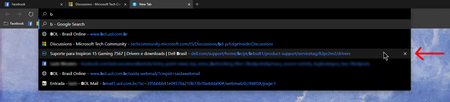

Deleted It is possible! But you'd never know by just using the browser. 😞
Use your keyboard [down arrow] to highlight the link you want to remove. Then press [Shift] + [Delete].
If you think this keyboard shortcut should be written in the URL suggestion bar (image below) so people actually know this feature exists, haha, feel free to give my feature request a like here, or better yet: submit it via the smiley.

ikjadoon This trick doesn't seem to work for me. I am trying to remove some legit websites but mainly some typos that I made at one time or another. Highlighting the item suggestion in the omnibox and hitting Shift/Delete does nothing at all.
Version 79.0.294.0 (Official build) canary (64-bit)
Windows 10 version 1909
O.S. build 18363.388
- ikjadoonOct 07, 2019Bronze Contributor
Oh, that's really weird. I'm on dev 79.0.287.3, so a few builds behind your canary, and it's still working here. A regression perhaps? Or something else perhaps using that shortcut?
If anyone on Canary can test, that'd be helpful.
But, yes: there really should be a mouse-based menu for this. A simple right-click context menu would definitely go far and hopefully alleviate where now, we can't even tell why it's failing. 😞
- leopeva64-2_Oct 07, 2019Iron Contributor
ikjadoon Yeah, something like this would be nice:
- Jacques Van de MeersscheOct 07, 2019Steel Contributor
ikjadoon It sure looks like something got lost along the way, I tried every possible key combination ( Ctrl, Alt, Shift, Fn, Winkey) with the Delete key and none of them work. Hope they get this fixed. I love your right click suggestion. HotCakeX could you confirm this problem on your Canary setup please?
- ikjadoonOct 08, 2019Bronze Contributor
Jacques Van de Meerssche That's real weird. Thanks for the troubleshooting, HotCakeX
Hopefully they can address it w/ the logging from the bug report.
Chrome (Chromium?) does have a few restrictions about what SHIFT + DEL can clear, apparently, which if/when Edge's team attacks this issue should resolve: https://superuser.com/questions/398385/deleting-a-specific-url-suggestion-in-chrome pages in history, etc.
