Forum Discussion

AmateurD
Sep 02, 2020Tin Contributor
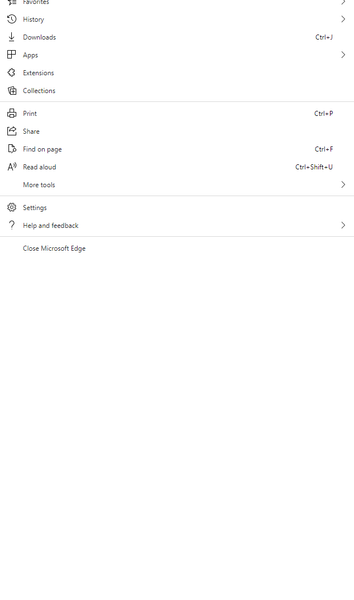
Bug in Edge browser on multiple monitors and menu button
I have a multi-monitor setup. If I click the menu button (...) the menu is incorrectly stretched, filled with white space and displayed on the wrong monitor. Some of the menu items then can't be clic...

ITBrett
Jun 25, 2021Copper Contributor
Any updates on this? I just started having this issue. I switched over to Edge for my default browser and discovered this problem. Edge is up to date, so obviously, MS has not fixed this.
 AmateurDJun 25, 2021Tin Contributor
No change as far as I can tell. I have learned to get used to it I suppose. Shame they haven't picked it up yet.
 unome120Sep 11, 2021Copper Contributor
AmateurD, I have found a couple work arounds:
1. Ensure all 3 monitors have the same scale and layout "Change the size of text, apps, and other items". Sometimes laptop monitors will have that set to 150% recommended.
2. Ensure the monitors are in the correct sequence (i.e. 3-2-1 or 1-2-3)
Both these options worked for me.
 UserJoshOct 23, 2021Copper ContributorEnsuring all 3 monitors are on the same scale worked for me (laptop display was set to 125% by recommended/default), thanks!