Forum Discussion

hussain5416
Nov 18, 2020Steel Contributor
[BUG] Allowing the blocked cookies not working from POPUP
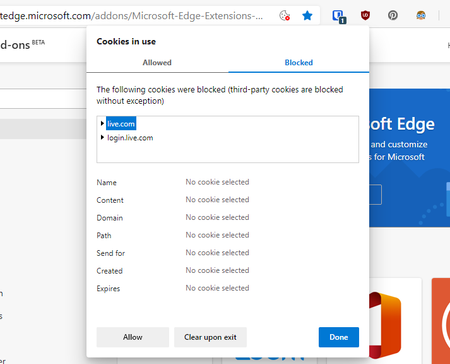
Deleted Allowing the blocked cookies doesn't work from that popup button, Although Blocking the allowed cookies is working fine. Take a look at the screenshot.

hussain5416
Nov 18, 2020Steel Contributor
Steps to reproduce the bug:
- Block 3rd party cookies in browser settings
- Go to https://microsoftedge.microsoft.com/addons/Microsoft-Edge-Extensions-Home (you can also try on other websites on which 3rd party cookies are blocked)
- A blocked cookies icon will appear in omini box, clicking which opens a popup
- Click 'Site not working' then 'Show cookies' then go to 'Blocked' section.
- Try to Allow the blocked cookies (NOT WORKING / BUG)
 slowsluggsMar 15, 2023Copper Contributorhow do you fix it 😞
- slowsluggsMar 15, 2023Copper Contributorwhen I try to sign in to YouTube (I'm already signed into google on the browser that's going on YouTube) It gives me an error message and I think its because cookies are blocked but when I click on the cookies are blocked thing it says they arent blocked but its a glitch. Can you help me person, I know this is an old thread but please help.