Forum Discussion

tistou
Jul 14, 2024Bronze Contributor
Black outline
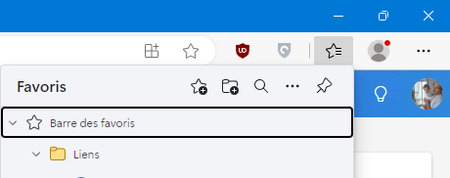
Hello MS put black outlines everywhere now, what's the point exactly ? Because it looks very ugly Favorites : Outlook.com :

JourneymanMC
Jul 22, 2024Iron Contributor
Hi there,
I can only produce these black outlines by navigating with the keyboard (TAB), and I believe keyboard navigation is part of "Ease of Access".
I found this page, maybe it'll help you;
https://support.microsoft.com/en-gb/microsoft-edge/accessibility-features-in-microsoft-edge-4c696192-338e-9465-b2cd-bd9b698ad19a#bkmk_high_visibility_outline
I can only produce these black outlines by navigating with the keyboard (TAB), and I believe keyboard navigation is part of "Ease of Access".
I found this page, maybe it'll help you;
https://support.microsoft.com/en-gb/microsoft-edge/accessibility-features-in-microsoft-edge-4c696192-338e-9465-b2cd-bd9b698ad19a#bkmk_high_visibility_outline

tistou
Jul 22, 2024Bronze Contributor
Thanks for your help, I looked and found nothing.
If you have the favorites button, when you click on it to open the menu, the "favorites bar" doesn't have this black outline, for example ?
I only have this in the favorites menu and outlook.com
If you have the favorites button, when you click on it to open the menu, the "favorites bar" doesn't have this black outline, for example ?
I only have this in the favorites menu and outlook.com