Forum Discussion

daibt
Oct 11, 2023Brass Contributor
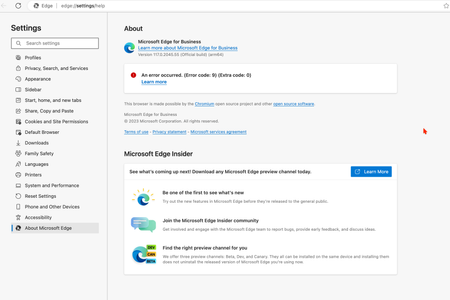
An error occurred. (Error code: 9) (Extra code: 0)
Hi All I tried to update my EDGE, and got error as picture below. Could you help me how to fix it? I am using EDGE on Mac
 Oct 17, 2023
CyrilYu run these commands would resolve the problem
sudo rm -rfv /Library/LaunchDaemons/com.microsoft.EdgeUpdater.*
sudo "/Applications/Microsoft Edge.app/Contents/Frameworks/Microsoft Edge Framework.framework/Versions/118.0.2088.46/Helpers/EdgeUpdater.app/Contents/MacOS/EdgeUpdater" --install --system --v=2
then restart edge browser, open `edge://settings/help`, problem should resolved
(found solution after extract MicrosoftEdge-118.0.2088.46.pkg and read scripts/postinstall)

Feejus
Oct 17, 2023Brass Contributor
I appreciate your explanation. However, it appears that this information mainly highlights that the software is malfunctioning and requires attention from Microsoft.
As for my second point, and as you correctly pointed out, even after clearing the LaunchDaemons and ensuring that no files remain, if I reinstall Edge by downloading it from scratch, why does the error recur?
I took the step of removing Edge using AppCleaner, which should have removed all associated files including the Edge file in /Library/LaunchDaemons/.

CyrilYu
Oct 17, 2023Copper Contributor
I tested on both my new Mac and a Mac VM; both successfully downloaded the updated login item located in /Library/LaunchDaemons/.
However, if you merely uninstall Edge, it won't allow the updated login item in /Library/LaunchDaemons/ to be downloaded. Even when using AppCleaner, Microsoft doesn't recognize it as a clean environment. The determining factor is the Microsoft keychain. If you haven't deleted it, Edge will log in automatically without requiring you to enter credentials.
From my tests (conducted three times), when macOS is brand new and Edge has never been installed, the new Edge updates as expected. This is because it can fetch the updated login items from /Library/LaunchDaemons/. Furthermore, I found that even on a brand-new macOS, if you remove login items from /Library/LaunchDaemons/, you can't retrieve them again.
I believe this is because one of Microsoft's servers is down, preventing us from smoothly updating from our old login item to the new one.
However, if you merely uninstall Edge, it won't allow the updated login item in /Library/LaunchDaemons/ to be downloaded. Even when using AppCleaner, Microsoft doesn't recognize it as a clean environment. The determining factor is the Microsoft keychain. If you haven't deleted it, Edge will log in automatically without requiring you to enter credentials.
From my tests (conducted three times), when macOS is brand new and Edge has never been installed, the new Edge updates as expected. This is because it can fetch the updated login items from /Library/LaunchDaemons/. Furthermore, I found that even on a brand-new macOS, if you remove login items from /Library/LaunchDaemons/, you can't retrieve them again.
I believe this is because one of Microsoft's servers is down, preventing us from smoothly updating from our old login item to the new one.