Forum Discussion

Add an icon for the "Add to dictionary" action (UI consistency)
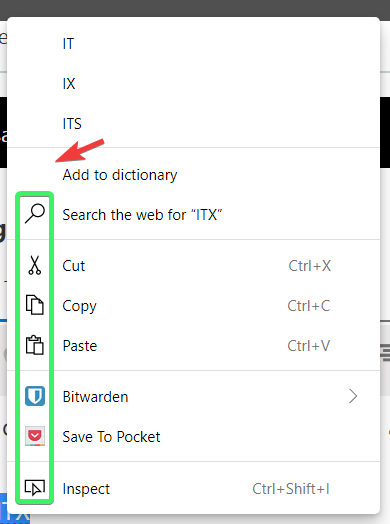

Dudes. Dudettes. Microsoft literally added the icon hours later. It's here.
Bravo, Microsoft.

ikjadoon, I am glad that you are happy with the way the spellchecker is progressing. Please let us know if you see anything else that you think needs to change, or that you particularly like.
- ikjadoonMay 18, 2019Bronze Contributor
Thank you very kindly for the reply. I'm seriously very impressed at the pace of updates.
What I love so far:
- ✅ Immediate visual feedback: adding to dictionary immediately removes the underline, confirming it worked
- ✅ Ease in removing accidentally added words (far, far simpler than https://www.thewindowsclub.com/remove-words-chrome-spelling-dictionary & https://support.mozilla.org/en-US/kb/how-do-i-use-firefox-spell-checker).
- ✅ Ease in adding new languages to the spellchecker
What I'd love to have implemented:
- Sync user misspelled words between devices.
It doesn't need to be a full radio option, but it could be combined with "Settings" sync and then noted somewhere. For me, I always would want it synced as a part of Settings because I transition often between a desktop & laptop during the day: they're essentially the same system for me!
It's always a PITA to go back to an older system and realize half my words (technical terms mostly) are being underlined.
