Forum Discussion

Don Cuthbert
Apr 09, 2020Brass Contributor
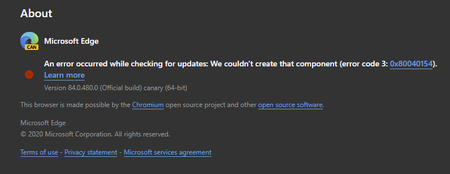
84.0.480.0 (Official build) canary (64-bit) shows error on About screen
An error occurred while checking for updates: We couldn't create that component (error code 3: https://go.microsoft.com/fwlink/?linkid=2068169&0x80040154). Version 84.0.480.0 (Official build) canary ...
- Apr 14, 2020Thanks but it was always an option for everyone at any time, not new to this.
this problem is fixed in the next Canary updates. also the updater works using these methods which is even better than the normal updater since user can set it to check for updates automatically every hour or every minute.
https://techcommunity.microsoft.com/t5/discussions/84-0-480-0-official-build-canary-64-bit-shows-error-on-about/m-p/1304083/highlight/true#M28779
https://techcommunity.microsoft.com/t5/discussions/84-0-480-0-official-build-canary-64-bit-shows-error-on-about/m-p/1303650/highlight/true#M28766


Dennis5mile
Apr 14, 2020Silver Contributor
Thanks. I'm just waiting to see if it will update without having to install ontop of current version..
Dennis5mile
Dennis5mile

Don Cuthbert
Apr 14, 2020Brass Contributor
Dennis5mile
Check a few posts up for a way that works. It basically runs the updater, as is done each day via Task Scheduler, but lets you do it at any time. Yours could be set to run at some specific hour of the day, so it will eventually update on its own. Mine did.
Try closing Edge Canary and running this (I don't know if you actually have to close Edge):
%LOCALAPPDATA%\Microsoft\EdgeUpdate\MicrosoftEdgeUpdate.exe /c