Forum Discussion

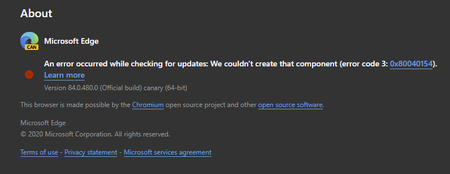
84.0.480.0 (Official build) canary (64-bit) shows error on About screen
- Apr 14, 2020Thanks but it was always an option for everyone at any time, not new to this.
this problem is fixed in the next Canary updates. also the updater works using these methods which is even better than the normal updater since user can set it to check for updates automatically every hour or every minute.
https://techcommunity.microsoft.com/t5/discussions/84-0-480-0-official-build-canary-64-bit-shows-error-on-about/m-p/1304083/highlight/true#M28779
https://techcommunity.microsoft.com/t5/discussions/84-0-480-0-official-build-canary-64-bit-shows-error-on-about/m-p/1303650/highlight/true#M28766


Deleted any update from the team on this issue?

Thank you all for your diligence and follow-up on this! We're in communication with the product team and will let you know as soon as we have confirmed what the next steps are, whether that be a fix ETA or potential workarounds.
Fawkes (they/them)
Project & Community Manager - Microsoft Edge
- Dennis5mileApr 13, 2020Silver Contributor
Deleted
Yep, confirming error still present in version "Version 84.0.484.0 (Official build) canary (64-bit)"
Thanks for the status update Deleted
Dennis5mile
- DeletedApr 13, 2020
Dennis5mile HotCakeX tistou derekamoss DavidGB ms4132 RedBeta Rohit Yadav Jacques Van de Meerssche Living4God1991 Mac_Van_Tan Dmytro-K thexfile TheShaunSaw MichaelC Don Cuthbert VBartlett1978 bilalop44
Hi everyone,
Good news: I just got confirmation from the product team that they are expecting this fix to ship in the next version of Canary! So hopefully, you should see this resolved very soon.
Thanks,
Fawkes (they/them)
Project & Community Manager - Microsoft Edge- Don CuthbertApr 13, 2020Brass Contributor
Deleted
Actually mine updates just fine to each new build. I believe that the %LOCALAPPDATA%/Microsoft/EdgeUpdate/MicrosoftEdgeUpdate.exe runs on a schedule and updates Canary build without any need to download it manually. I did nothing today and my Edge had updated itself to 484.0 just fine (while not in use yet -- perhaps when my computer booted).
So this error seems only to affect the "Check for Updates" that is normally done by opening or refreshing the About page in Settings at edge://help . I don't know if that update method actually works or not, but the MicrosftEdgeUpdate.exe that you posted earlier does work to update without re-running the full installer.
- HotCakeXApr 13, 2020MVPThank you, hope that happens before this version ships to Dev channel

