Forum Discussion

Don Cuthbert
Apr 09, 2020Brass Contributor
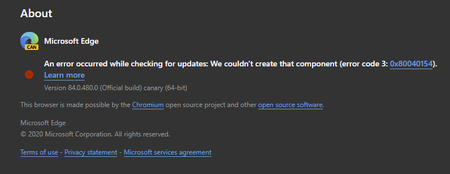
84.0.480.0 (Official build) canary (64-bit) shows error on About screen
An error occurred while checking for updates: We couldn't create that component (error code 3: https://go.microsoft.com/fwlink/?linkid=2068169&0x80040154). Version 84.0.480.0 (Official build) canary ...
- Apr 14, 2020Thanks but it was always an option for everyone at any time, not new to this.
this problem is fixed in the next Canary updates. also the updater works using these methods which is even better than the normal updater since user can set it to check for updates automatically every hour or every minute.
https://techcommunity.microsoft.com/t5/discussions/84-0-480-0-official-build-canary-64-bit-shows-error-on-about/m-p/1304083/highlight/true#M28779
https://techcommunity.microsoft.com/t5/discussions/84-0-480-0-official-build-canary-64-bit-shows-error-on-about/m-p/1303650/highlight/true#M28766


DavidGB
Apr 09, 2020Steel Contributor
But it does mention Error 0x80040154

Mac_Van_Tan
Apr 09, 2020Brass Contributor
Hello DavidGB!
It have mention the error code 0x80040154, you have to expand Windows 10 in the seventh part and then find your error code to fix the problem.
- HotCakeXApr 10, 2020MVP
Mac_Van_Tan wrote:It have mention the error code 0x80040154, you have to expand Windows 10 in the seventh part and then find your error code to fix the problem.
Yes we all did that, what I said is that "error code 3" is missing, not that part.