Forum Discussion

Don Cuthbert
Apr 09, 2020Brass Contributor
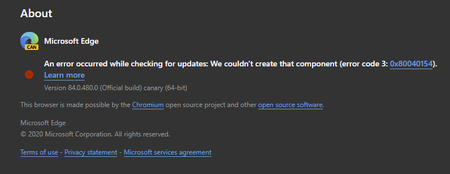
84.0.480.0 (Official build) canary (64-bit) shows error on About screen
An error occurred while checking for updates: We couldn't create that component (error code 3: https://go.microsoft.com/fwlink/?linkid=2068169&0x80040154). Version 84.0.480.0 (Official build) canary ...
- Apr 14, 2020Thanks but it was always an option for everyone at any time, not new to this.
this problem is fixed in the next Canary updates. also the updater works using these methods which is even better than the normal updater since user can set it to check for updates automatically every hour or every minute.
https://techcommunity.microsoft.com/t5/discussions/84-0-480-0-official-build-canary-64-bit-shows-error-on-about/m-p/1304083/highlight/true#M28779
https://techcommunity.microsoft.com/t5/discussions/84-0-480-0-official-build-canary-64-bit-shows-error-on-about/m-p/1303650/highlight/true#M28766

HotCakeX
Apr 09, 2020MVP
By the way I just finished installing and testing Edge canary Version 84.0.480.0 on Windows Sandbox which is a clean fresh OS and the problem still happened.
so this proves that the problem is not caused by any previous installations or left over files malfunctioning.
I think when Microsoft fixes this in the next update and puts it on their servers, we all have to reinstall our Edge canary because the connection between updater and server is interrupted.
another thing is that on the support page there is no mention of "error 3".
https://support.microsoft.com/en-us/help/4533311/microsoft-edge-troubleshooting-tips-for-installing-and-updating
so this proves that the problem is not caused by any previous installations or left over files malfunctioning.
I think when Microsoft fixes this in the next update and puts it on their servers, we all have to reinstall our Edge canary because the connection between updater and server is interrupted.
another thing is that on the support page there is no mention of "error 3".
https://support.microsoft.com/en-us/help/4533311/microsoft-edge-troubleshooting-tips-for-installing-and-updating

DavidGB
Apr 09, 2020Steel Contributor
But it does mention Error 0x80040154
 Mac_Van_TanApr 09, 2020Brass Contributor
Hello DavidGB!
It have mention the error code 0x80040154, you have to expand Windows 10 in the seventh part and then find your error code to fix the problem.
- HotCakeXApr 10, 2020MVP
Mac_Van_Tan wrote:It have mention the error code 0x80040154, you have to expand Windows 10 in the seventh part and then find your error code to fix the problem.
Yes we all did that, what I said is that "error code 3" is missing, not that part.
- HotCakeXApr 09, 2020MVPI know but there are also error codes 4, 7, 12 but not 3 so that article needs to be updated.
maybe there are 0x80040154 code 4, 0x80040154 code 7, 0x80040154 code 12 too.
plus, the suggestion action which is reinstalling Edge because the files are corrupted is unrelated. the files might be corrupted but reinstalling doesn't help. ms4132Apr 09, 2020Steel Contributor
I am seeing the same error on three different machines with three different versions of Windows. Thanks for posting this message and your experiences. Hopefully the next update will resolve this issue.