Forum Discussion

Don Cuthbert
Apr 09, 2020Brass Contributor
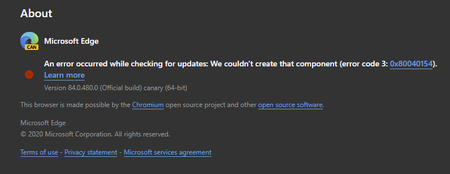
84.0.480.0 (Official build) canary (64-bit) shows error on About screen
An error occurred while checking for updates: We couldn't create that component (error code 3: https://go.microsoft.com/fwlink/?linkid=2068169&0x80040154). Version 84.0.480.0 (Official build) canary ...
- Apr 14, 2020Thanks but it was always an option for everyone at any time, not new to this.
this problem is fixed in the next Canary updates. also the updater works using these methods which is even better than the normal updater since user can set it to check for updates automatically every hour or every minute.
https://techcommunity.microsoft.com/t5/discussions/84-0-480-0-official-build-canary-64-bit-shows-error-on-about/m-p/1304083/highlight/true#M28779
https://techcommunity.microsoft.com/t5/discussions/84-0-480-0-official-build-canary-64-bit-shows-error-on-about/m-p/1303650/highlight/true#M28766

HotCakeX
Apr 09, 2020MVP
Hi,
thanks, that really saved me some time knowing that uninstall/reinstall won't fix it because so far I tried restarting computer and changing some network settings but none of them worked 🙂
thanks, that really saved me some time knowing that uninstall/reinstall won't fix it because so far I tried restarting computer and changing some network settings but none of them worked 🙂
- HotCakeXApr 09, 2020MVPBy the way I just finished installing and testing Edge canary Version 84.0.480.0 on Windows Sandbox which is a clean fresh OS and the problem still happened.
so this proves that the problem is not caused by any previous installations or left over files malfunctioning.
I think when Microsoft fixes this in the next update and puts it on their servers, we all have to reinstall our Edge canary because the connection between updater and server is interrupted.
another thing is that on the support page there is no mention of "error 3".
https://support.microsoft.com/en-us/help/4533311/microsoft-edge-troubleshooting-tips-for-installing-and-updating- Don CuthbertApr 09, 2020Brass Contributor
HotCakeX A friend had an error like this on an earlier build a week or two ago. Probably the next Canary update will simply auto-update as usual, without issue. If not, running the Installer without uninstalling it will probably work as they suggest.
 DavidGBApr 09, 2020Steel ContributorBut it does mention Error 0x80040154
 Mac_Van_TanApr 09, 2020Brass Contributor
Hello DavidGB!
It have mention the error code 0x80040154, you have to expand Windows 10 in the seventh part and then find your error code to fix the problem.
