Forum Discussion

安装之后web内所有控件变得巨大
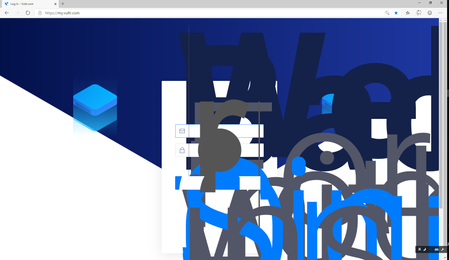


can you please navigate to the language settings (if possible)
edge://settings/languages
and change it to English, temporarily?
just to confirm that this is a problem with Chinese language or not.
also which version of Windows 10 are you using? Thanks

我好像发现造成这个问题的原因了。是“Customize fonts”里“Minimum font size”的默认值似乎是"Tiny"。但是它好像没有正常工作,反而将字体变得巨大,我在Edge Canary Channel里艰难的找到了“Minimum font size”并拖动了一下后面的圆圈,浏览器就变得正常了。在这之前将"font size"更改为“Medium(Recommended)”,并没有作用。 或许你们需要检查一下“Minimum font size”的参数设置,谢谢!
I seem to find the cause of this problem. The default value of "Minimum font size" in "Customize fonts" seems to be "Tiny". But it doesn't seem to work properly, but it makes the fonts huge. I found the "Minimum font size" in the Edge Canary Channel and dragged the circle behind it, and the browser became normal. Changing "font size" to "Medium (Recommended)" before this has no effect.
Maybe you need to check the parameter settings of "Minimum font size", thank you!
edge://settings/appearance
- HotCakeXOct 06, 2019MVP
Hi,
here is the default values on Edge insider Canary
so if you set your appearance settings like that, the texts will become Huge instead?
- SatoneRPOct 06, 2019Tin Contributor
But today I updated windows 10 to 1903, and did not reinstall the Canary Channel, but opened it directly to see that the problem still exists. Then I manually adjusted the minimum font size in the settings and the problem was solved.
In the evening, I can go back and try to reinstall the Canary Channel under the 1903 version.- HotCakeXOct 06, 2019MVPSo the problem was that the font sizes were not at their default values when you installed Edge insider beta For the First Time?