Forum Discussion

Welcome to the Microsoft Edge Insiders community
Hello Microsoft Edge Insiders!
Ever since we first announced in December that Microsoft Edge was going to adopt the Chromium open source project for our desktop browser, we’ve been excited to begin launching our Insider community. The time has finally come, and everyone can try out the new version of the browser right now!
We want to use this opportunity to start building a close relationship with all of you. Going beyond collecting comments and reviews, we’re eager to listen and engage in active conversations with you. We believe your collective voices will help us build a better Microsoft Edge, and that’s our vision for this community.
With our recent adoption of Chromium, Microsoft Edge gets a chance to grow beyond its initial home on Windows 10. As we’ve reflected on the best ways to enable a new listening system to support other versions of Windows and platforms, we’ve realized that our goals should be based on what we want as customers, not as engineers or designers.
What would such a system look like? That’s where all of you come in. Based on the feedback you’ve graciously given us over the past few years, we know it’s important to be able to quickly and easily send us problems or suggestions from directly within the browser. You also want a way to engage meaningfully and deeply with the developers, as well as a way to get immediate support when you run into a problem that you can’t fix on your own.
Other Insider programs at Microsoft have provided good models for us to follow for our new community. However, the Microsoft Edge Insider community has one important difference: you don’t need to sign up. Just downloading and using the Microsoft Edge Canary, Dev, or Beta channels is enough.
We hope that this relationship can be beneficial for both parties. For you, this isn’t just about being a member of an active group of fellow browser enthusiasts. You also get: a chance to see new features before all the other Microsoft Edge users; an in-depth understanding of how and why we built them, a direct channel of communication with the engineers responsible for them, and the chance to critique them and suggest what we should build next. We at Microsoft get valuable early feedback, your verbal and written insights about what you do and don't like about a given feature or approach, which will help us steer the product in the right direction. The ability to dig deeper and understand the why behind the what, while learning from a large and diverse worldwide audience. Finally, through our continuing conversations, we hope Insiders will invite others in their own communities to come and join in our conversation.
So, what can you expect from us? As our new features start making their way into the builds, our goal is to publish at least one new article every other week to inform and encourage active discussions on the latest developments in the Insider channels. We are devoting some of our time to reading and responding to every thread, and you can expect direct interaction from the Microsoft Edge team that promotes the deepest, most enlightening discussions.
We’re fully committed to building an open, honest and respectful community of awesome Insiders like you. We hope you’ll join our discussions or start your own today.
Welcome to our community. We can’t wait to build a great Edge community together!
-The Microsoft Edge Team-
313 Replies
 misterjayteeCopper Contributor
As someone who has a lot of tabs open (due to mutiple streams of work, projects, research etc.), the main annoyance of Chrome (and thus this new Edge) is the lack of ability to have multiple rows of tabs. So if you have many tabs open in Chrome/Edge, the tabs get smaller and you can't see what the tab is.
With multi-row tabs, you can always see what's on each tab. It would be great if this ability was built into Edge.
- Elliot KirkFormer EmployeeGood feedback, misterjaytee. Have you tried other management solutions for lots of tabs? What have you found helpful? What have you found not so helpful?
Elliot- misterjayteeCopper Contributor
Elliot Kirk In Firefox I always used Tab Mix Plus, but stopped using this when FF went to Quantum (TMP no longer worked due to API deficiencies).
I have also tried OneTab on Chrome, which should work for my scenario but having to go into another place just isn't as prominent as having the tabs in your face screaming at you to finish your research/work :)
I think that a nice solution would be to allow a tab to be right-clicked so that you can add the URL to the "new tab" page easily; and optionally on the new tab page to have a folder that you can add URLs to (so you can group URLs into relevant workstreams).
Rgds,
Jim
- David61Copper Contributor
I'm sorry to start off somewhat negative in my first reply, but it is what it is.
The new Edge seems to be a decent browser in my opinion, even for its development status. I'm using it right now. I've also used the version of Edge that is currently packed in Windows 10 regularly, and it's okay too. But no version of Edge will ever be my default and "daily driver" browser until there is a way to totally stop all autoplaying video and audio. This is the number one reason that Firefox (sorry for using a dirty word in here) is my default. Elliot Kirk
- Elliot KirkFormer Employee
- David61Copper Contributor
Elliot Kirk wrote:
This is great feedback, David61. What level of autoplay settings are you looking for?
Thanks,
ElliotI want to be able to turn off ALL autoplay. It's not that I don't like video or audio playing. I just don't like them playing automatically...especially at 3 am in the morning when the house is silent or I'm listening to music. Since I listen to music via streaming on the same PC I do most of my surfing on, muting audio is simply not an option. Nothing should be playing unless I tell it to play. Elliot Kirk
 Anonymous
Looking good and is snappy. Unfortunately without an option to sync to my Google Account and make it work flawlessly with my phone, it is a non-starter. Elliot Kirk
- Elliot KirkFormer EmployeeThanks for the feedback, Deleted.
- SnowboundBrass Contributor
Is there any know problem with the Edge Dev not showing up in Windows 10 1809 Pro x64 list of Notification Apps? I have spent time configuring all of my Chrome Extensions but I rely on notifications of my browser. When I check the App Notification list MS Edge does not show up. Firefox and Chrome do however.
- Elliot KirkFormer EmployeeI believe that an application needs to send a notification before it will show up in the list of applications on the notification settings page. I am not sure, however, if you can force the preview versions of Edge to pop a notification to get onto that list. Please let me know if it does show up for you.
Elliot
 SasRadCopper Contributor
You guys had a great browser that was ignored by many, but those of us who used it knew what it had to offer. Don't forget all the great features the original Edge had! I hope to see them all making a return and much more!
-Dark Mode
-Light weight while running
-Instant cold startup-Easy "continue on" with Edge on Mobile
-Better Bing integration
-Cortana integration
-Page Drawing and Sharing
-Reading List
-etc- Elliot KirkFormer EmployeeThank you SasRad. Keep your eyes peeled in the coming weeks and months as we continue to bring updates to the preview channels. Let us know how we are doing,
Elliot
 lossesCopper Contributor
Side bar for bookmarks, downloads and history please, like the old edge, with a better design :D
- Elliot KirkFormer EmployeeCan you tell me more about what you like about the fly-in sidebar for downloads, bookmarks and history in the current version of Edge?
- Drew1903Silver Contributor
Elliot Kirk
Excuse, I know you're not asking me, but, I have an thought about this...
Because, you don't want to, actually, leave the page or site being viewed. AND the 'enquiry' is likely related to where one is... you want to, STILL, (be able to) see where you are... NOT, be switched to a completely different tab/page. Panels make MUCH more sense! That should NOT be changed! to these full pages.
Cheers,
Drew
- AnonymousHey, looking forward for this new version of Edge, we can't sign in using Work accounts, I hope this will be fixed soon.
- Elliot KirkFormer EmployeeThank you Deleted, we are working on it.
- vinnyMSCopper ContributorCan IBM Watson options be added to edge to detect and score on the text of web pages so the nature of the text detected can be read in advance
- vinnyMSCopper ContributorHi
Is it possible to add a list of chosen words to replace with other words.
Tomorrow >> the next day
News >> information
Etc.
It's useful to replace words we read online, for parents and children also- Elliot KirkFormer EmployeeThis is an interesting suggestion, vinnyMS. Are you imagining that this would be done automatically for you? Would there be any way to undo or know that it had occured on the website that you were looking at?
- PGarfunkelCopper Contributor
Elliot Kirk started testing and already looks and functions great; was able to ditch Chrome already, within hours. Would love to be able to completely remove the current Edge but understand it is still heavily integrated into the OS.
Weird note: installed Chromium Edge Dev on my work laptop - all good.
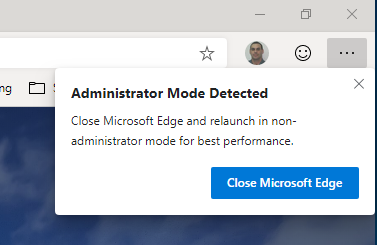
Now installing on my home laptop; every time I launch it I get a 'edge administrator mode detected' - I believe this may not be an Edge Dev exclsuive issue buy perhaps I can find the answer here...
And, no: I have not checked the properties to run this specific app (or any, for that matter) in admin mode.
Thanks!
- PGarfunkelCopper ContributorDisregard; forgot about user account control -sorry