Forum Discussion

*Updated 9/3* Syncing in Microsoft Edge Preview Channels
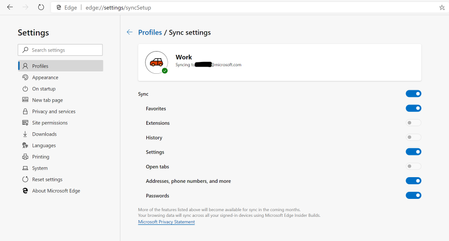
 May 18, 2019
Hi All,
We have rolled out a fix to the problem where clients were reporting error on sync. We expect an app restart should get the client back into a functional state for sync now. We so much appreciate your patience and willingness to help all this while. Apologies that it took us time to get this fix across to you. If you still see any errors, please submit using in-app feedback button (and drop me a private message so that we jump on it faster). Sincere thanks for working with us on building a better product.
Ankur
CC. @Mike_BNL , @DiggsMcGee , @bassoprofundo , @indospot , @Stephen Berard , @billbyrnes

I have a payment method setup in my Microsoft account - why doesn't it show up in Edge Beta?
- HotCakeXSep 23, 2019MVPIf it doesn't show in beta then there is a problem, try switching to Dev or Canary for now till it gets fixed.
https://support.microsoft.com/en-in/help/4026388/microsoft-account-check-how-much-money-is-in-your-microsoft-account - Drew1903Sep 23, 2019Silver Contributor
Greg Hejl
Greg,
> (Edge C) Settings > Profiles. Click on Go to my account then, hit Payment & billing and > Payment options. Payment info will not, does not do the same. This is the same as my prior description with Edge going through the OS Settings window... ends up at the same place.
Cheers,
Drew - HotCakeXSep 23, 2019MVPTry Edge insider Dev. it's newer than Beta and shows my payment options.
- Drew1903Sep 22, 2019Silver Contributor
Hi Greg,
I could provide snips upon request/if needed. But, here is why... If open Edge & hit YOUR name/logo it goes to a Settings page under Email & Accounts. If you hoover at your Name/logo it says Change account settings. Now, if at that Settings page (window) you go to Your info, there is, under Billing info & more, Manage my Microsoft Account. Hitting that goes to everything about ones MS Account. The point is, it's because the Edge Insider Build Channels are not integrated within the OS. They are not an integral part of the OS so, they are not talking to things, tied to things, the way Edge is or can & does. This will change once Edge C replaces Edge... rather than running beta Insider Builds. The Insider Builds are like lab projects, research & test projects... they don't replace, are not replacing actual, normal browsers, such as Edge. It's not YOUR browser, Edge is yours... you're taking Edge C for a test-drive, a dry-run; not the same relationship as you & Edge. (right now). Nature of the beast... betas won't be Fully 100% same as 'the real thing'. And, that's why, that's the reason.
Whereas, if you do the same on the Edge C browser & follow to Payment info, there's nothing. Plus, there really is no similar path to the complete MS Account Info page, at all, either. In other words, it does not direct to the Settings windows nor any Manage my Account, like Edge will. It's not part of the OS and you the way Edge is; can't be, 1 is a work-in-progress & the other is not & that explains differences.
2ndly, Edge is, still, being developed, evolving & in fairly early stages... thing can & will change over time. Maybe what I suggest will prove to be wrong down the road, but, for now, it's my story & I'm sticking to it (wink) <- yeah, there's no wink thingy
Cheers,
Drew

