Forum Discussion

*Updated 9/3* Syncing in Microsoft Edge Preview Channels
 May 18, 2019
Hi All,
We have rolled out a fix to the problem where clients were reporting error on sync. We expect an app restart should get the client back into a functional state for sync now. We so much appreciate your patience and willingness to help all this while. Apologies that it took us time to get this fix across to you. If you still see any errors, please submit using in-app feedback button (and drop me a private message so that we jump on it faster). Sincere thanks for working with us on building a better product.
Ankur
CC. @Mike_BNL , @DiggsMcGee , @bassoprofundo , @indospot , @Stephen Berard , @billbyrnes

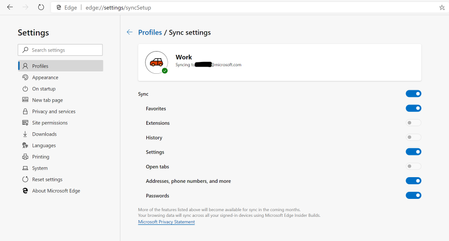
Elliot Kirk I'm signed-in with a MSA on an AD-joined PC (Windows 10 1903). Sync settings are shown as enabled, however, nothing (at least not Favorites and passwords) is synced. I installed Edge Beta on another PC (also Windows 10 1903) that is not AD nor AAD-joined, and it syncs with my MSA.
If syncing with MSA is in fact disabled on an AD-joined PC, as the current Edge (which I think is a very annoying thing by itself, but that's a different topic), then it should shown as such.

I installed 1 Canary, Dev, Beta Edge each on 3 devices, so 9 together. I didn't see any problems so far, except at the beginning. Even after the beta installations, the synchronization only took a few seconds to get everything in the beta. This seems to happen only sporadically.
- jimliuAug 25, 2019Copper ContributorAnd the device is also AD-joined? MSA sync works very well on my personal PC. But it doesn't work on my work PC. I've installed Edge Beta for about two days and restarted Windows once.