Forum Discussion

*Updated 9/3* Syncing in Microsoft Edge Preview Channels
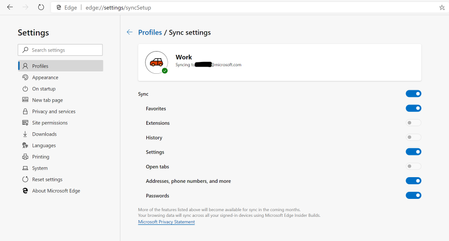
 May 18, 2019
Hi All,
We have rolled out a fix to the problem where clients were reporting error on sync. We expect an app restart should get the client back into a functional state for sync now. We so much appreciate your patience and willingness to help all this while. Apologies that it took us time to get this fix across to you. If you still see any errors, please submit using in-app feedback button (and drop me a private message so that we jump on it faster). Sincere thanks for working with us on building a better product.
Ankur
CC. @Mike_BNL , @DiggsMcGee , @bassoprofundo , @indospot , @Stephen Berard , @billbyrnes

Deleted That is strange, I just added this page to my Favorites Bar on the current Canary version on my computer. Opened my Note 9 which has Android version 9 installed, and when I checked my Favorites, this page was there without a problem and absolutely no delay in the sync process.

It is strange. It works on my Samsung tablet, but not on my Samsung phone running the same version of Android.
- LarryE1946May 10, 2019Brass Contributor
Deleted The plot thickens. Just tried to sync on my Galaxy Tab S3 and it says it is synced but no favorites at all. I made sure I had the latest version of Edge and I have Android 8 version on the tablet, have no idea what is going on. I uninstalled the app on the tablet and re-installed and still no sync.
- r33zAMay 21, 2019Brass ContributorI've installed a fresh copy of canary this morning and am having no joy what so ever getting it to sync this morning. It's log in with no errors but the switch to turn on favorites is grayed out.
Also noticed on my iPhone all my favorites were doubled up?
I wouldn't think syncing bookmarks isn't a new thing? MS have been syncing lots of things and not just bookmarks for a very very long time, or am I wrong and its hard or different with the new edge chromium? - DeletedMay 10, 2019Not applicable
It thickens even more. When I first set up Edge on my Android tablet (which is also a Samsung Galaxy Tab S3), it worked in that it synced all my existing favorites from my Edge Canary version on my computer to the tablet. Now however, when I add a new favorite to my Edge Canary, it doesn't get synced to my tablet and I get an error "Can't sync (0x4)".
- DeletedMay 12, 2019Not applicable
Deleted
An update.
The other day I was getting an error on my tablet ""Can't sync (0x4)". Now I am not getting that error. The status shows Synced and it says it was synced just now, but newly added favorites in Edge Chromium Canary are still not syncing to my my tablet.
My phone now also shows a status of Synced. It shows it was synced just now. My original favorites were synced to the phone, but my newly added favorites are not syncing.
