Forum Discussion

 Microsoft
Introducing web capture for Microsoft Edge
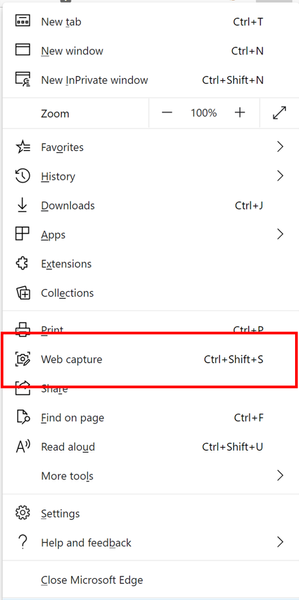

I know how it works, been using it myself, on Edge legacy, this feature first takes a full screen capture of the website and then lets you work on it, on new Edge it asks you to specify an area of the web page and then work on it, could be full screen as well (either you take the full screen capture or wait till they add the full screen capture button to web capture). either way it's basically the same procedure.
add the web capture button to the Edge toolbar then you can launch it using 1 click/tap.

HotCakeX I think justwantinkingback has a valid point though that the new inking experience feels a lot less like inking on the webpage and much more like inking on a screenshot, no matter how big that screenshot may be.
I made a comment on pg.5 about how Inking now takes you out of the webpage by making it feel like a second screenshot-specific window is popping up, rather than just being a seamless interaction with the page, and I think this goes quite well with what justwantinkingback is saying, because that seamlessness is what makes the old version much better and more natural.
- HotCakeXNov 16, 2020MVPNo,
if you have the bug use the feedback button to send a report. - HotCakeXNov 16, 2020MVPOkay.
- HotCakeXOct 30, 2020MVPI don't understand what you're asking now
- HotCakeXOct 29, 2020MVP
Full Page screen capture
Now whenever you click on Web Capture button, you are presented with these options:
Edge Version 88.0.680.1 (Official build) dev (64-bit)
- HotCakeXOct 24, 2020MVP
well, by user you mean yourself,
and I care more about how it technically works because that's what produces results, not what it makes me feel like.
also this is not the completed version of web capture, more features are on the way.
I think instead of exactly copying what Edge legacy had, Edge developers only need to take the core idea and implement it in any way or shape that is more productive, the exact 1 on 1 copying is not necessary at all. because nothing is perfect and something that existed 5 years ago can definitely improve now.
- DRelliot90Oct 24, 2020Brass Contributor
HotCakeX Whilst that may be the case technically, you might have misunderstood my reply as I am referring to the user experience, which is of course what the large majority of Edge users will be concerned about.
To the user, the previous inking experience was seamless enough to make it feel as if you were simply writing on the web page - whether or not that was actually technically the case.
Web Capture does not have that same seamless feel and takes you 'out' of the page, in my opinion.
- HotCakeXOct 24, 2020MVP
both Edge legacy and new Edge take a screenshot of the webpage, there is no live editing. you can't draw on HTML files. this is the main point that you need to remember.
