Forum Discussion

 Microsoft
Introducing web capture for Microsoft Edge

No, native live webpage inking is not back.
I downloaded the dev version last night and it’s still just the screen capture tool with markup.... like 100’s of similar programs and add-ones that already exist.
On legacy edge that came with my Surface Pro 7 there was a pen icon next to the URL bar. When hit, I could write on any page instantly with the ability to scroll. It was very intuitive and just worked fluidly.
That feature does not exist anymore and my Surface is now a $1,700 paperweight.
Hopefully someone from MS can shed some light on when this feature is coming back and not just a screenshot tool.

"When hit, I could write on any page instantly with the ability to scroll. It was very intuitive and just worked fluidly."
You can exactly do the same on Edge dev now. write on it with ink, instantly, with the ability to scroll. intuitive and fluid.
This will probably change but right now you need to specify which part of the web page you want to work on but they said in the future they will add a button to take full screen screen captures, just like Edge legacy. there is no live editing in Edge legacy, it also took screenshots, they were just full screen captures.
- justwantinkingbackOct 23, 2020Copper Contributor
HotCakeX The screen capture tool in EdgeDev is not the same as EdgeLegacy.
See pics.
In Legacy, one tap of the pen icon you could immediately start drawing anywhere on the web page, scroll up and down, add notes, clip, and save to OneNote.
One button tap.
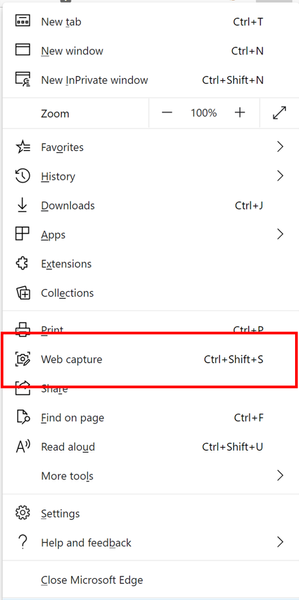
Now in EdgeDev you have to open up the browser options tab, open the screenshot tool, re-size the clipping (which doesn't really work well to get a whole page), then hit the draw button, save it, re-size the clipping further down the page, hit draw again, save it, repeat as many times as necessary to get a whole page if it's a long one, open them all up in Photoshop and stitch them all together.
That is not an intuitive work flow compared to how quick and easy Edge Legacy was (again see pics).
This problem is not resolved and there are thousands of us Surface owners who just want the old way of inking back in Edge.- HotCakeXOct 24, 2020MVP
I know how it works, been using it myself, on Edge legacy, this feature first takes a full screen capture of the website and then lets you work on it, on new Edge it asks you to specify an area of the web page and then work on it, could be full screen as well (either you take the full screen capture or wait till they add the full screen capture button to web capture). either way it's basically the same procedure.
add the web capture button to the Edge toolbar then you can launch it using 1 click/tap.
 DRelliot90Oct 24, 2020Brass Contributor
HotCakeX I think justwantinkingback has a valid point though that the new inking experience feels a lot less like inking on the webpage and much more like inking on a screenshot, no matter how big that screenshot may be.
I made a comment on pg.5 about how Inking now takes you out of the webpage by making it feel like a second screenshot-specific window is popping up, rather than just being a seamless interaction with the page, and I think this goes quite well with what justwantinkingback is saying, because that seamlessness is what makes the old version much better and more natural.

