Forum Discussion

 Microsoft
Introducing web capture for Microsoft Edge
 Microsoft
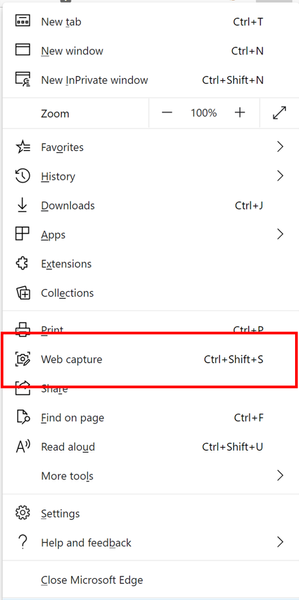
SumitDhiman this is the first version of 'inking on web content' feature which we had in legacy Microsoft Edge. You can capture web content right now, inking support would be rolling in coming weeks. Got a bit delayed, so not exactly September but pretty close  . I hope that helps.

Vyankatesh_Gadekarany update on when Inking webpages is coming back? That little pen icon in the Legacy Edge version was insanely useful for doing live webdesign reviews with clients over Skype.
- HotCakeXOct 22, 2020MVP
justwantinkingback wrote:Vyankatesh_Gadekarany update on when Inking webpages is coming back? That little pen icon in the Legacy Edge version was insanely useful for doing live webdesign reviews with clients over Skype.
it is back, this is on Edge Dev Version 88.0.673.0 (Official build) dev (64-bit)
i selected an area of this page using web capture that is exactly the same feature from Edge legacy and I can ink on it, save it, share it with other apps such as OneNote etc.
- justwantinkingbackOct 22, 2020Copper ContributorHotCakeX
No, native live webpage inking is not back.
I downloaded the dev version last night and it’s still just the screen capture tool with markup.... like 100’s of similar programs and add-ones that already exist.
On legacy edge that came with my Surface Pro 7 there was a pen icon next to the URL bar. When hit, I could write on any page instantly with the ability to scroll. It was very intuitive and just worked fluidly.
That feature does not exist anymore and my Surface is now a $1,700 paperweight.
Hopefully someone from MS can shed some light on when this feature is coming back and not just a screenshot tool.- HotCakeXOct 23, 2020MVP
"When hit, I could write on any page instantly with the ability to scroll. It was very intuitive and just worked fluidly."
You can exactly do the same on Edge dev now. write on it with ink, instantly, with the ability to scroll. intuitive and fluid.
This will probably change but right now you need to specify which part of the web page you want to work on but they said in the future they will add a button to take full screen screen captures, just like Edge legacy. there is no live editing in Edge legacy, it also took screenshots, they were just full screen captures.
